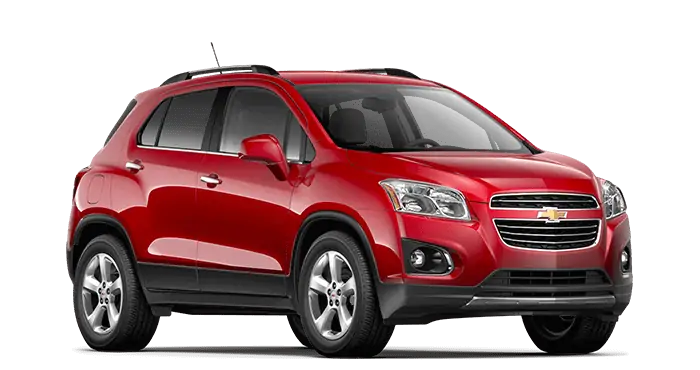
April 28, 2016 NHTSA CAMPAIGN NUMBER: 16V257000
No ‘Key Left in Ignition’ Warning Chime/FMVSS 114
Without audible indicators, the driver may leave the key in the ignition, increasing the risk of theft.
NHTSA Campaign Number: 16V257
Manufacturer General Motors LLC
LLC
Components EQUIPMENT, ELECTRICAL SYSTEM
Potential Number of Units Affected 317,572
Summary
General Motors LLC (GM) is recalling certain model year 2013-2016 Chevrolet Sonic and Trax vehicles and 2013-2015 Chevrolet Spark vehicles equipped with a Bring Your Own Media radio. The affected radios may fail to provide an audible warning chime when the driver, after turning off the ignition and leaving the key in the cylinder, waits 10 minutes or longer to open the door. As such, these vehicles fail to comply with the requirements of Federal Motor Vehicle Safety Standard (FMVSS) number 114 “Theft Protection.”
Remedy
GM will notify owners, and dealers will update the radio software, free of charge. The manufacturer has not yet provided a notification schedule. Owners may contact Chevrolet customer service at 1-800-222-1020. GM’s number for this recall is 17130.
Notes
Owners may also contact the National Highway Traffic Safety Administration Vehicle Safety Hotline at 1-888-327-4236 (TTY 1-800-424-9153), or go to www.safercar.gov.
Check if your Vehicle has a Recall
SEOCONTENT-START
Bulletin No.: 17130E
Date: February 2018
F/CMVSS NONCOMPLIANCE RECALL |
| Subject: | Loss of Key Reminder Chime |
| Models: | 2013-2016 Chevrolet Sonic |
| 2013-2015 Chevrolet Spark | |
| 2013-2016 Chevrolet Trax | |
| Equipped with Bring Your Own Media (RPO UF7) |
| The Service Procedure and the Warranty Information sections have been revised. Effective immediately, technicians MUST record the Warranty Claim Code on the Job Card. To avoid warranty transaction rejection, this information must be entered when submitting the transaction. If the Same Calibration/Software Warning is noted on the SPS Controller screen, continue with the programming event using SPS to ensure a Warranty Claim Code is displayed on screen. Please discard all copies of bulletin 17130D. |
| It is a violation of Federal law for a dealer to deliver a new motor vehicle or any new or used item of motor vehicle equipment (including a tire) covered by this notification under a sale or lease until the defect or noncompliance is remedied. |
| Vehicles involved in this recall were placed on stop delivery April 27, 2016. Once the service procedure contained in this bulletin has been performed on the vehicle, the vehicle is released from stop delivery and the vehicle can be delivered to the customer.
All involved vehicles that are in dealer inventory must be held and not delivered to customers, dealer traded, or used for demonstration purposes until the repair contained in this bulletin has been performed on the vehicle. |
Condition
General Motors has decided that certain 2013-2016 model year Chevrolet Sonic and Trax vehicles and 2013-2015 model year Chevrolet Spark vehicles equipped with a bring your own media (“BYOM”) (RPO UF7) radio may not comply with Federal/Canada Motor Vehicle Safety Standard No. 114, “Theft protection and rollaway prevention.” BYOM radio software in these vehicles may fail to provide an audible warning/reminder chime when the driver, after turning off the ignition and leaving the key in the cylinder, waits 10 minutes or longer to open the door for the first time. The vehicle may also fail to provide – or provide a shortened – audible warning when the driver opens the door, hears a chime, leaves the key in the ignition, closes the door, and subsequently opens the door a second time more than 20 seconds later. If no key reminder chime sounds to alert the driver to a key left in the ignition, there is an increased risk of theft.
Correction
Dealers are to reprogram the radio with corrected operating software.
Vehicles Involved
All involved vehicles are identified by Vehicle Identification Number on the Investigate Vehicle History screen in GM Global Warranty Management system. Dealership service personnel should always check this site to confirm vehicle involvement prior to beginning any required inspections and/or repairs. It is important to routinely use this tool to verify eligibility because not all similar vehicles may be involved regardless of description or option content.
For dealers with involved vehicles, a listing with involved vehicles containing the complete vehicle identification number, customer name, and address information has been prepared and will be provided to US and Canadian dealers through the GM GlobalConnect Recall Reports, or sent directly to export dealers. Dealers will not have a report available if they have no involved vehicles currently assigned.
The listing may contain customer names and addresses obtained from Motor Vehicle Registration Records. The use of such motor vehicle registration data for any purpose other than follow-up necessary to complete this recall is a violation of law in several states/provinces/countries. Accordingly, you are urged to limit the use of this report to the follow-up necessary to complete this recall.
Parts Information
There are no parts required for this procedure.
Service Procedure
Note: Carefully read and follow the instructions below.
- Ensure the programming tool is equipped with the latest software and is securely connected to the data link connector. If there is an interruption during programming, programming failure or control module damage may occur.
- Stable battery voltage is critical during programming. Any fluctuation, spiking, over voltage or loss of voltage will interrupt programming. When required install the EL-49642 SPS Programming Support Tool to maintain system voltage. If not available, connect a fully charged 12 V jumper or booster pack disconnected from the AC voltage supply. DO NOT connect a battery charger.
- Turn OFF or disable systems that may put a load on the vehicles battery such as; interior lights, exterior lights (including daytime running lights), HVAC, radio, etc.
- Clear DTCs after programming is complete. Clearing powertrain DTCs will set the Inspection/Maintenance (I/M) system status indicators to NO.
Note: When performing this software update, TIS2WEB will automatically select the latest calibrations that are designed to address this concern and close this field action.
Note: The programming process for this bulletin REQUIRES hardwired connections for the MDI to the TIS2WEB PC USB port and from the TIS2WEB PC to the dealership internet connection due to the length of this update.
Note: If, after successful USB programming, you encounter an SPS error during/after normal programming where SPS shows “Operation 27 | ErrorCode FD”, STOP. Make no further programming attempts and contact TCSC. Below is an example of this error.
| Line | Operation | Error Code |
| 2 | 27 | FD |
| Question | Answer |
| Why am I receiving a warning for the same calibrations? | |
| The radio “locked-up” during programming, is left with no communication, an E-4491 error code, and/or is unable to program again. What can be done to prevent this? |
|
| The right steering wheel control is inoperative after programming. Why is this? |
|
| I received a “Place vehicle in park message” when trying to program a manual transmission vehicle. What should I do? |
|
| Where do I find the Spark or Trax in TIS2WEB if it does not automatically find it from reading the VIN? |
|
| When programming a Spark or Trax in TIS2WEB, I do not see an “A11 Radio – Programming” or “A11 Radio – USB File Transfer” option. Where are these located? | |
| I’ve encountered a SMD File Invalid Message and can’t continue with programming. What do I do? | |
| During the USB file transfer download process in TIS2WEB, some models ask to choose the “Model Designator” from a list of codes. Where do I find this information so I choose the correct Model Designator? |
|
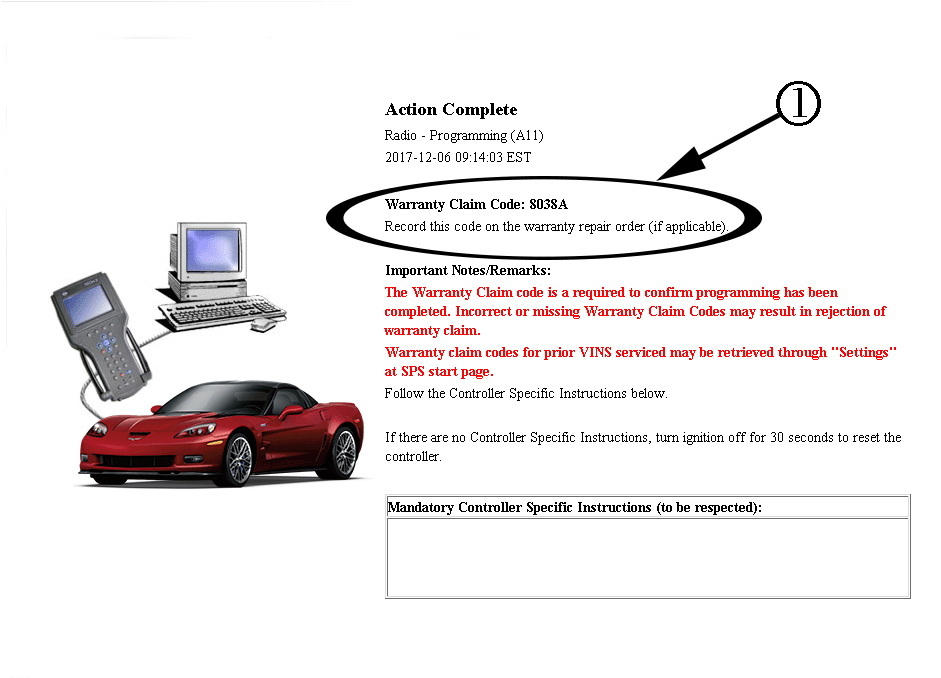
Note: If the Same Calibration/Software Warning is noted on the SPS Controller screen, continue with the programming event using SPS to ensure a Warranty Claim Code is displayed on screen. Technicians MUST record the Warranty Claim Code (1) on the Job Card. To avoid warranty transaction rejection, this information must be entered when submitting the transaction.
- Install EL-49642 SPS programming support tool.
- Access the Service Programming System (SPS) and follow the on-screen instructions.
Note: All existing files on the USB drive will be erased when the new files are copied.
- Connect a USB drive to the computer.
- On the SPS Supported Controllers screen, select A11 Radio – USB File Transfer, and follow the on-screen instructions.
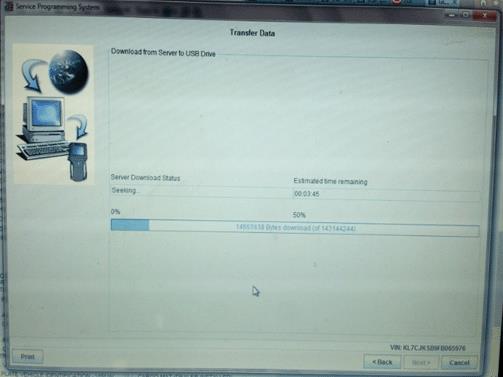
- Upon completion of the file transfer, remove the USB drive from the computer.
- Ignition ON, radio ON.
- Connect the USB drive to the USB port in the vehicle.
Note: If “Update” is not selected within 30-60 seconds, the selection screen disappears and the USB drive will need to be removed and reinserted to initiate the USB software update again.
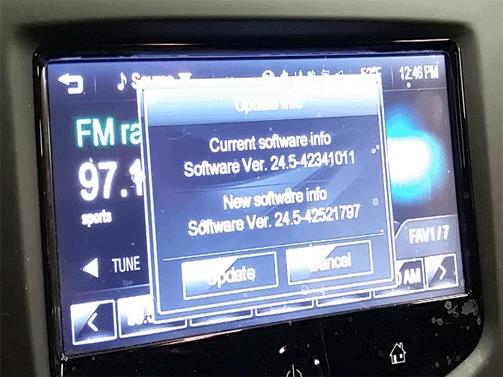
- Follow the infotainment display on screen instructions and select “Update” when prompted. (Trax shown as example-Sonic and Spark will be similar.
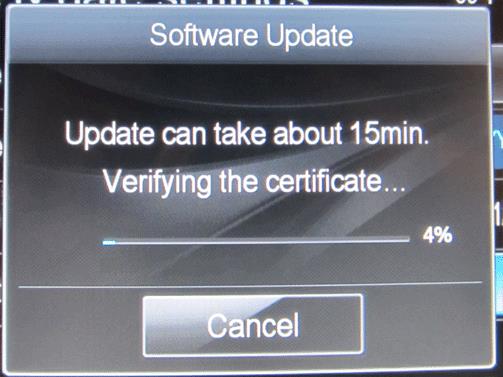
- Programming will take several minutes.
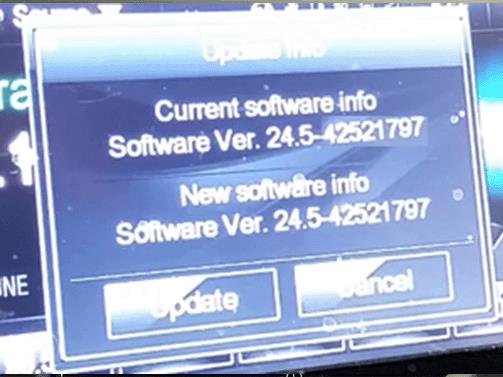
Note: When USB programming has completed, the radio will go to the Home/Menu screen, and the calibration ID screen will show, confirming the current and new software is now the same. Audio should be playing before removing the USB drive. Select “Cancel” and continue to step 10. (Trax shown as example-Sonic and Spark will be similar).
- When USB programming is complete, remove the USB device from the vehicle USB port and access the Service Programming System (SPS) and follow the on-screen instructions.
- When USB programming has been completed, on the SPS Supported Controllers screen, select A11 Radio – Programming, and follow the on-screen instructions.
Note: During SPS programming, the radio display may be blank. For progress, refer to the SPS screen.
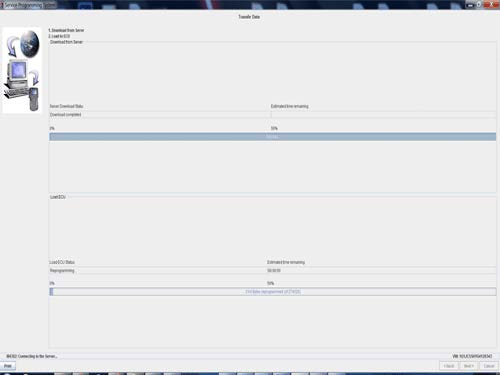
Note: After the radio has completed SPS programming, the radio will restart. DO NOT cycle the key or turn off the radio until audio is heard.
- At the end of programming, clear DTC’s.
Note: If you have programming concerns or SPS error codes, call the Techline Customer Support Center. TCSC can be reached at 1-800-828-6860.
Floor Plan Reimbursement
Dealers in possession of vehicles included in the Stop Delivery are eligible for reimbursement of floor plan expense upon completion of this recall. This reimbursement is limited to the number of days from the Stop Delivery message to receipt of the recall parts and/or repair procedures. Floor plan reimbursement beyond these dates is not allowed. The amount of reimbursement should be charged as a net amount expense using the recall labor operation provided.
Courtesy Transportation – For US and Canada
The General Motors Courtesy Transportation program is intended to minimize customer inconvenience when a vehicle requires a repair that is covered by the New Vehicle Limited Warranties. The availability of courtesy transportation to customers whose vehicles are within the warranty coverage period and involved in a product program is very important in maintaining customer satisfaction. Dealers are to ensure that these customers understand that shuttle service or some other form of courtesy transportation is available and will be provided at no charge. Dealers should refer to the General Motors Service Policies and Procedures Manual for Courtesy Transportation guidelines.
Warranty Transaction Information
Submit a transaction using the table below. All transactions should be submitted as a ZFAT transaction type, unless noted otherwise.
Note: To avoid having to “H” route the floor plan transaction for approval, it must be submitted prior to the repair transaction.
| Labor Code | Description | Labor Time | Net Item |
| 9102184* | Radio Reprogramming using USB | 0.6 | N/A |
| 9102197 | Floor Plan Reimbursement | N/A | *** |
* To avoid warranty transaction rejections, the SPS Warranty Claim Code must be entered when submitting this transaction.
** The amount identified in the “Net Item” column should represent the product of the vehicle’s average daily interest rate (see table below) multiplied by the actual number of days the vehicle was in dealer inventory and not available for sale. This reimbursement is limited to the number of days from the date of the stop delivery message (April 27, 2016) to the date the repair is completed and the vehicle is ready for sale (not to exceed 16 days):
| Vehicle | US Reimbursement Amount | Canadian Reimbursement Amount |
| 2013 Chevrolet Sonic | $2.24 | $3.09 |
| 2014 Chevrolet Sonic | $2.33 | $3.48 |
| 2014 Chevrolet Trax | N/A | $3.76 |
Customer Notification – For US and Canada
General Motors will notify customers of this recall on their vehicle (see copy of customer letter included with this bulletin).
Customer Notification – For Export
Letters will be sent to known owners of record located within areas covered by the US National Traffic and Motor Vehicle Safety Act. For owners outside these areas, dealers should notify customers using the attached sample letter.
Dealer Recall Responsibility – For US and Export (US States, Territories, and Possessions)
It is a violation of Federal law for a dealer to deliver a new motor vehicle or any new or used item of motor vehicle equipment (including a tire) covered by this notification under a sale or lease until the defect or noncompliance is remedied.
The US National Traffic and Motor Vehicle Safety Act provides that each vehicle that is subject to a recall of this type must be adequately repaired within a reasonable time after the customer has tendered it for repair. A failure to repair within sixty days after tender of a vehicle is prima facie evidence of failure to repair within a reasonable time. If the condition is not adequately repaired within a reasonable time, the customer may be entitled to an identical or reasonably equivalent vehicle at no charge or to a refund of the purchase price less a reasonable allowance for depreciation. To avoid having to provide these burdensome remedies, every effort must be made to promptly schedule an appointment with each customer and to repair their vehicle as soon as possible. In the recall notification letters, customers are told how to contact the US National Highway Traffic Safety Administration if the recall is not completed within a reasonable time.
This bulletin is notice to you that the new motor vehicles included in this recall may not comply with the standard identified above. Under Title 49, Section 30112 of the United States Code, it is illegal for a dealer to sell a new motor vehicle which the dealer knows does not comply with an applicable Federal Motor Vehicle Safety Standard. As a consequence, if you sell any of these motor vehicles without first performing the recall correction, your facility may be subject to a civil penalty for each such sale.
Dealer Recall Responsibility – All
All new, used, GM Certified Used, courtesy transportation vehicles, dealer shuttle vehicles, etc. in dealers’ possession and subject to this recall must be held and inspected/repaired per the service procedure of this bulletin before customers take possession of these vehicles. Involved vehicles must be held and not delivered to customers, dealer-traded, released to auction, used for demonstration, or any other purpose.
All GM Certified Used vehicles currently in the dealers’ inventory within the Certified Pre-Owned Inventory System (CPOIS) will be de-certified and must be held and remedied per the service procedure in this bulletin. Upon submitting an accepted/paid warranty transaction in the Global Warranty Management (GWM) system, the vehicle can be re-certified for sale within the CPOIS system, or once again be used in the CTP program.
Dealers are to service all vehicles subject to this recall at no charge to customers, regardless of mileage, age of vehicle, or ownership, from this time forward.
Customers who have recently purchased vehicles sold from your vehicle inventory, and for which there is no customer information indicated on the dealer listing, are to be contacted by the dealer. Arrangements are to be made to make the required correction according to the instructions contained in this bulletin. A copy of the customer letter is provided in this bulletin for your use in contacting customers. Recall follow-up cards should not be used for this purpose, since the customer may not as yet have received the notification letter.
In summary, whenever a vehicle subject to this recall enters your vehicle inventory, or is in your facility for service in the future, you must take the steps necessary to be sure the recall correction has been made before selling or releasing the vehicle.
IMPORTANT SAFETY RECALL
May 2016
Dear General Motors Customer:
This notice applies to your vehicle, VIN: _____________________________________
This notice is sent to you in accordance with the National Traffic and Motor Vehicle Safety Act.
General Motors has decided that certain 2013-2016 model year Chevrolet Sonic and Trax vehicles and 2013-2015 model year Chevrolet Spark vehicles equipped with a bring your own media (“BYOM”) radio, may not comply with Federal/Canada Motor Vehicle Safety Standard 114, “Theft protection and rollaway prevention.” As a result, GM is conducting a recall. We apologize for this inconvenience. However, we are concerned about your safety and continued satisfaction with our products.
|
IMPORTANT
|
| Why is your vehicle being recalled? | BYOM radio software in these vehicles may fail to provide an audible warning/reminder chime when the driver, after turning off the ignition and leaving the key in the cylinder, waits 10 minutes or longer to open the door for the first time. The vehicle may also fail to provide – or provide a shortened – audible warning when the driver opens the door, hears a chime, leaves the key in the ignition, closes the door, and subsequently opens the door a second time more than 20 seconds later. If no key reminder chime sounds to alert the driver to a key left in the ignition, there is an increased risk of theft. |
| What will we do? | Your GM dealer will reprogram the radio with corrected operating software. This service will be performed for you at no charge. Because of service scheduling requirements, it is likely that your dealer will need your vehicle longer than the actual service correction time of approximately 40 minutes. |
| What should you do? | You should contact your GM dealer to arrange a service appointment as soon as possible. |
| Do you have questions? | If you have questions or concerns that your dealer is unable to resolve, please contact the appropriate Customer Assistance Center at the number listed below. |
| Division | Number | Text Telephones (TTY) |
| Chevrolet | 1-800-630-2438 | 1-800-833-2438 |
| Puerto Rico – English | 1-800-496-9992 | |
| Puerto Rico – Español | 1-800-496-9993 | |
| Virgin Islands | 1-800-496-9994 |
If after contacting your dealer and the Customer Assistance Center, you are still not satisfied we have done our best to remedy this condition without charge and within a reasonable time, you may wish to write the Administrator, National Highway Traffic Safety Administration, 1200 New Jersey Avenue, SE, Washington, DC 20590, or call the toll-free Vehicle Safety Hotline at 1.888.327.4236 (TTY 1.800.424.9153), or go to https://www.safercar.gov. The National Highway Traffic Safety Administration Campaign ID Number for this recall is 16V257.
Federal regulation requires that any vehicle lessor receiving this recall notice must forward a copy of this notice to the lessee within ten days.
Jeffrey M. Boyer
Vice President
Global Vehicle Safety
GM Recall 17130
SEOCONTENT-END
Closed Product Field Actions Re-Opened Due to Missing or Invalid Warranty Claim Codes Recalls 15176, 15240, 15299, 15808, 16007, 17130, 17276, 17287 and 45340
A warranty audit of paid transactions for the safety and noncompliance recalls identified above revealed that some transactions were submitted without a Warranty Claim Code (WCC) or with an incorrect WCC. This code is generated when a control module is successfully programmed using the TIS Service Programming System (SPS). Since these transactions were identified as not having a valid WCC, the status of the involved vehicles was changed from “closed” to “open” in the Required Field Actions section of Investigate Vehicle History (IVH). Dealer message GCUS-3-1280 dated June 26, 2018 provides additional details (see attached copy).
Q1: Will these transactions be debited?
No, only the field action is being re-opened in IVH in the interest of customer safety. However, some previous transactions for recall 15299 were re-opened and debited on March 16, 2018. These transactions are now being worked by the Warranty Support Center (WSC) to cancel the debits and re-credit the affected dealers. Future transactions that do not contain a valid WCC may be debited, if dealers do not take appropriate actions resolve this situation.
Q2: What if a dealer can’t locate the current vehicle owner?
If the current vehicle owner cannot be located, no further action is necessary. GM uses state vehicle registration records to regularly update owner of record information for open field actions. These updates are available on the Open Vehicle Report (OVR), which is posted monthly in GM GlobalConnect. Product field action reminder notices are also mailed to the new vehicle owners as they are identified.
Q3: Will a dealer be paid to program a vehicle a second time?
Yes, if a second programming event is required, dealers should open a new job card and re-use the labor code and labor time from the applicable bulletin. To facilitate this activity, an update was made in Service Programming System (SPS) which allows a technician to override the “same calibration” warning on these specific recall reprogramming events. This provides the ability to perform the second programming event and obtain a new WCC.
Q4: If another dealer was originally involved, can any dealer perform the second programming event and how do they get paid?
Performance of the second programming event is not restricted to the dealer who performed the original programming event and did not submit a valid WCC. In such cases, dealers should submit a transaction as they normally do, using the labor code and labor time from the applicable bulletin. The first dealer to submit a transaction with a valid WCC will be paid and the recall will be closed in IVH. Exceptions will be addressed on a case-by-case basis by the GM Warranty Support Center (WSC).
Q5: If a valid WCC is retrievable from dealer records, can the original transaction be adjusted in the GWM system?
Yes, if the original transaction was processed within the past 2 years, the transaction can be adjusted (adding the WCC) on-line in the GWM system. Dealers should not use their Dealer Management System (DMS) to do this.
Q6: If a dealer has a valid WCC and is re-submitting an original transaction that is less than 2 years old, are they entitled to labor time?
As a technician is not required in this case, dealers are not entitled to claim additional labor time. A dealer however may submit a $20.00 administrative allowance as compensation for processing the second transaction. After adding the WCC to the original transaction’s “SPS Warranty Claim Code” field the dealer may add $20.00 to the Net Item/Admin Allowance field and resubmit the transaction.
Q8: What should a dealer do if they have a valid WCC, but the original transaction is over 2 years old? Can they resubmit the transaction?
No, the dealer should create a new job card making sure to use all the information from the first job card (open date, mileage and technician code, etc.). After adding the WCC to the transaction’s “SPS Warranty Claim Code” field and $20.00 to the Net Item/Admin Allowance field, the dealer should submit the new transaction.
Q9: What should a dealer do if a valid WCC is not retrievable from dealer records?
If a valid WCC was not recorded on the shop copy of the job card and/or is not retrievable from the SPS history log, the involved vehicle must be reprogrammed to generate a new WCC. Using the labor code and labor time provided in the bulletin, the dealer should create a new job card. Note that the dealer is entitled to whatever time is listed in the bulletin, but not the $20.00 administrative allowance. Upon completion of this second programming event, the dealer should submit the new transaction making sure to include the new WCC.
Q10: Will the system reject these transactions due to age or mileage?
There is no “over-age” or “mileage rollback” edit in place for the resubmission of these transactions, so they should pay without the need for wholesale authorization.
SEOCONTENT-END
11 Affected Products
Vehicles
27 Associated Documents
Recall Quarterly Report #1, 2016-2
RCLQRT-16V257-8492.PDF 214.534KB
Safety Bulletin – Bulletin No.: 17130 Date: April 2016
RCSB-16V257-7965.pdf 123.721KB
To View or Download this Document Click Here
Manufacturer Notices(to Dealers,etc) – Date: April 27, 2016 Subject: Stop Delivery Order for Upcoming Noncompliance Recall 17130
Manufacturer Notices(to Dealers,etc) – Date: May 2, 2016 Subject: 17130A – Noncompliance Recall Loss of Key Reminder Chime Service Procedure Revised
Safety Bulletin – Bulletin No.: 17130A Date: May 2016
RCSB-16V257-3664.pdf 123.632KB
To View or Download this Document Click Here
Manufacturer Notices(to Dealers,etc) – Date: April 28, 2016 Subject: 17130 – Noncompliance Recall Loss of Key Reminder Chime
Safety Bulletin – Bulletin No.: 17130B Date: May 2016
RCSB-16V257-5931.pdf 307.298KB
To View or Download this Document Click Here
Manufacturer Notices(to Dealers,etc) – Date: May 11, 2016 Subject: 17130B – Noncompliance Recall Loss of Key Reminder Chime Floor Plan and Customer Notification Letter Added, Service Procedure Revised
ISSUED Owner Notification Letter(Part 577)
RCONL-16V257-2588.pdf 104.416KB
Recall Acknowledgement
Safety Bulletin – Bulletin No.: 17130C Date: June 2016
RCSB-16V257-2733.pdf 313.639KB
To View or Download this Document Click Here
Defect 573 Report
RCLRPT-16V257-3287.PDF 215.213KB
Manufacturer Notices(to Dealers,etc) – Date: June 13, 2016 Subject: 17130C – Noncompliance Recall Loss of Key Reminder Chime Service Procedure Revised
Recall Quarterly Report #5, 2017-2
RCLQRT-16V257-1480.PDF 214.947KB
Safety Bulletin – Bulletin No.: 17130D Date: December 2017
RCSB-16V257-1823.pdf 374.983KB
To View or Download this Document Click Here
Manufacturer Notices(to Dealers,etc) – Date: December 15, 2017 Subject: 15808B – Noncompliance Recall Revised No Key in Reminder Chime and/or No Audio
Recall Quarterly Report #4, 2017-1
RCLQRT-16V257-7111.PDF 214.833KB
Recall Quarterly Report #3, 2016-4
RCLQRT-16V257-5014.PDF 214.738KB
Recall Quarterly Report #6, 2017-3
RCLQRT-16V257-5352.PDF 215.033KB
Safety Bulletin – Bulletin No.: 17130E Date: February 2018
RCSB-16V257-9285.pdf 367.154KB
To View or Download this Document Click Here
Manufacturer Notices(to Dealers,etc) – Date: February 1, 2018
Dealer FAQs 16Jul2018
RMISC-16V257-3931.pdf 136.796KB
Dealer FAQs 16Jul2018
RMISC-16V257-6294.pdf 201.176KB
Manufacturer Notices(to Dealers,etc) – Date: June 26, 2018 Subject: Select Safety and Noncompliance Recalls Closed Transactions Reopened Due to Warranty Audit See Table Below
RCMN-16V257-8260.pdf 105.234KB
Manufacturer Notices(to Dealers,etc) – Date: July 16, 2018 Subject: Service Programming System Warranty Claim Code Audit Frequently Asked Questions (FAQs)
Reopened Recalls Involving Module Reprogramming Events – FAQs
RMISC-16V257-0316.pdf 71.752KB
Manufacturer Notices(to Dealers,etc) – Date: October 11, 2018 Subject: Reopened Recalls Involving Module Reprogramming Events
Latest Recalls Documents
Reprogramming
GM Diagnostic/Programming (TIS2Web)
Approved J2534 Device with TIS2WEB can reprogram 1996 and later All GM Modules.
To obtain the latest electronic controller calibration information for your vehicle, go to https://tis2web.service.gm.com/tis2web and enter the vehicle's 17 character Vehicle Identification Number (VIN) and select 'Get CAL ID’.
You can then compare the latest part number with the actual number installed on the vehicle to determine if a reprogram is needed.
The Service Programming System (SPS) application is part of the TIS2Web system. To program an ECU, the SPS application must communicate with the vehicle control modules using the proper J2534 programming interface tool.
The Tech 2 supports model years 1996 and beyond. With the addition of the CAN Diagnostic Interface (CANdi) module, Tech 2 is fully backward compatible with current Tech 2 functionality and operates transparently when diagnosing non-CAN-equipped vehicles.
Servicing the next generation Global A vehicles will require the diagnostic software, GDS2, Global Diagnostic System 2 running on a local PC device while the MDI is connected to the vehicle. The GM MDI is the Global Diagnostic tool for future vehicles starting with Global A vehicles.
The GM MDI was introduced in the fall of 2007 for Pass-Thru programming and offers faster programming speed. It can be used to perform Pass-Thru programming on all vehicles built since 1996 and into the future. Click here to view a list of GDS supported vehicles.

- J2534 Pass-Thru Programmer: TOPDON RLink J2534 is an advanced diagnostic and reprogramming tool that support all J2534 protocols, as well as D-PDU, CAN-FD and DoIP, ensuring compatibility with a wide range of modern vehicles. It offers extensive versatility with support for over 18 major automotive brands, including Chrysler, Ford, GM, Nissan, Toyota, Honda, Subaru, Land Rover/Jaguar, Volvo, Wuling, Volkswagen/Audi, Mercedes-Benz, and BMW. NOTE: Not compatible with Ford IDS diagnostic software
- All-in-One OEM Diagnostics: This J2534 ECU programming tool elevates your automotive repair capabilities to new heights by delivering complete OEM diagnosis. Boasting comprehensive full-system diagnostics, intuitive repair guides, advanced ECU programming and coding, common reset services, a vast library of repair information and more, this all-in-one solution empowers technicians to effortlessly tackle complex vehicle issues with ease. *Not compatible with 24V vehicles
- Proven Performance You Can Trust: Backed by over 10000 real vehicle tests and benefit from a wealth of practical experience, this OEM reprogramming tool guarantees stable and exceptional performance. Supported by TOPDON's dedicated technical experts with in-depth knowledge of both auto repair and J2534 Pass-Thru programming, the RLink J2534 provides prompt and professional assistance, ensuring a smooth setup and reliable compatibility
- Integrated Excellence, Always Up-to-Date: Featuring the exclusive RLink Platform to provide a streamlined experience with one-click driver installation and management, ensuring flawless integration with your OE software, maintaining the original performance quality. The built-in operation guide makes mastering OE software quick and easy, so you can get started right away. Plus, with lifetime free updates, your diagnostics will stay current with the latest drivers and innovations
- Efficiency Meets Versatility: Engineered to support three CAN channels simultaneously - CAN FD and CAN-CC included, giving you the edge in fast troubleshooting. To perfectly synchronized with the OE software, please diagnose with active subscriptions and make sure your computer system is running a compatible 64-bit Windows version (7, 8, 10 or later) to fully leverage the power of RLink J2534. *We don't provide extra OE software

- Advanced VCI Box, Industry-leading J2534 Pass-Thru Technology: This J2534 Pass-Thru Programmer is designed espically for technicians, independent shop owners, and DIY enthusiasts, enables fast, reliable computer-based programming. It supports all J2534 protocols—including the latest DoIP and CAN FD—ensuring full compatibility with both legacy and next-generation vehicles.
- High-Speed OEM-Level Diagnostics & Programming: Unlock true OEM functionality with comprehensive system diagnostics, guided troubleshooting, coding, adaptations, resets, and programming—all designed to slash repair time. This all-in-one tool eliminates the need for multiple OEM devices, boosting efficiency and cutting costs. Equipped with High-Speed USB, it delivers 10x more data per second than competing solutions
- Coverage for 17 Car Brands & Ultra Reliability: Works seamlessly for Chrysler, for Ford(Forscan), for GM, for Nissan, for Toyota, for Honda, for Subaru(SSM4), for Land Rover/Jaguar, for Volvo, for Wuling, for Volkswagen, for Mercedes-Benz, and for BMW. Backed by over 10000 real vehicle tests and benefit from a wealth of practical experience, this OEM reprogramming tool guarantees stable and exceptional performance
- User-Friendly RLink Platform & Expert Support: TOPDON’s proprietary driver management platform offers a clean interface and lifetime free updates. Access a rich library of real-world case studies to stay ahead of the curve. Backed by a support team with 10+ years of J2534 and automotive repair experience, we provide one-on-one assistance to resolve any technical issue.
- 6.6 ft USB-C Cable & Portable Storage Case: The RLink J2534 diagnostic tool features a 6.6ft USB 2.0 Cable and a 1.2 ft OBDII Extension Cable, allows to connection your computer easily outside the vehicle. The included handled carry case offers easy portability, storage, and hanging options—keeping your gear clean and ready to go, anywhere.

- Dual WiFi & 10.1" Touchscreen: Provides a stable, high-speed wireless link 3x faster than bluetooth, and a responsive, professional interface. Topdon ONE obd2 scanner diagnostic tool ensures smooth, non-lagging diagnostic scan, boosting mechanic efficiency
- J2534 Pass-Thru Support: The included ONE VCI supports the J2534 standard, allowing it to function as a pass-thru device when paired with OEM diagnostic software.Through TOPDON’s RLink platform, technicians can perform dealer-level coding, expanding in-house capabilities without investing in multiple factory automotive scan tools
- OE Topology Mapping: Visualize the vehicle’s ECU network exactly as it’s built.Zoom, pan, and highlight specific modules to pinpoint component issues with precision.Topology mapping displays real-time communication between modules
- 50+ Service Functions: Covers high-demand services like ADAS calibration, DPF regen, TPMS reset, ABS bleed, and throttle adaptation.Expands your service menu, allows you to charge premium rates, and turns away zero jobs due to lack of tooling. Vehicle-specific functionality may vary
- Advaned ECU Coding: 10 of the most serviced brands in North America, including full ECU coding and flash hidden support for BMW, VW, Au-di, Benz, Porsche, Toyota, Ni ssan and more. Enables module replacement, feature customization, and personal settings with automatic backup or restore.Lets your shop safely offer high-margin customization services, attracting more customers and boosting profit
This product presentation was made with AAWP plugin.