NHTSA ID Number: 10089486
Manufacturer Communication Number: 09184C
Summary
“09184C – CUSTOMER SATISFACTION PROGRAM (REVISED SERVICE PROCEDURE). THIS BULLETIN HAS BEEN REVISED TO CLARIFY STEP 5 OF THE SERVICE PROCEDURE. CERTAIN 2007-2009 MODEL YEAR CHEVROLET SILVERADO AND GMC SIERRA VEHICLES CURRENTLY OR PREVIOUSLY REGISTERED IN ALASKA, CONNECTICUT, DELAWARE, DISTRICT OF COLUMBIA, ILLINOIS, INDIANA, IOWA, MAINE, MARYLAND, MASSACHUSETTS, MICHIGAN, MINNESOTA, MISSOURI, NEW HAMPSHIRE, NEW JERSEY, NEW YORK, OHIO, PENNSYLVANIA, RHODE ISLAND, VERMONT, WEST VIRGINIA, AND WISCONSIN MAY HAVE A CONDITION IN WHICH THE SENSING AND DIAGNOSTIC MODULE (SDM) MAY CORRODE DUE TO A SIGNIFICANT QUANTITY OF SNOW AND/OR WATER CONTAINING ROAD SALT OR OTHER CONTAMINANTS ENTERING THE VEHICLE AND SATURATING THE ACOUSTICAL PADDING BENEATH THE CARPET. THE SDM IS LOCATED UNDER THE DRIVER’S SEAT BENEATH THE ACOUSTICAL PADDING. IF SUFFICIENT MOISTURE COLLECTS AND IS RETAINED IN THE PADDING, IT MAY CAUSE EXCESSIVE CORROSION UNDER THE SDM THAT COULD COMPROMISE THE MODULE SEAL AND ALLOW WATER INTRUSION THAT COULD RESULT IN SDM MALFUNCTION. IF THIS CONDITION EXISTS, THE AIRBAG READINESS LIGHT OR A “SERVICE AIRBAG” MESSAGE ON THE DRIVER INFORMATION CENTER (DIC) MAY ILLUMINATE. IN RARE CASES, THE VEHICLE MAY CONTACT ONSTAR® AND THE SEAT BELT PRETENSIONERS OR FRONT AIRBAGS MAY DEPLOY. DEALERS ARE TO REMOVE THE ACOUSTICAL PAD ABOVE THE SDM, INSPECT THE SDM, AND REPLACE THE SDM, IF NECESSARY.”
6 Affected Products
Vehicles
SEOCONTENT-START
#09184C: Customer Satisfaction – Material Over Sensing and Diagnostic Module Retaining Moisture – (Dec 10, 2015)
| Subject: | 09184C — Material Over Sensing and Diagnostic Module Retaining Moisture |
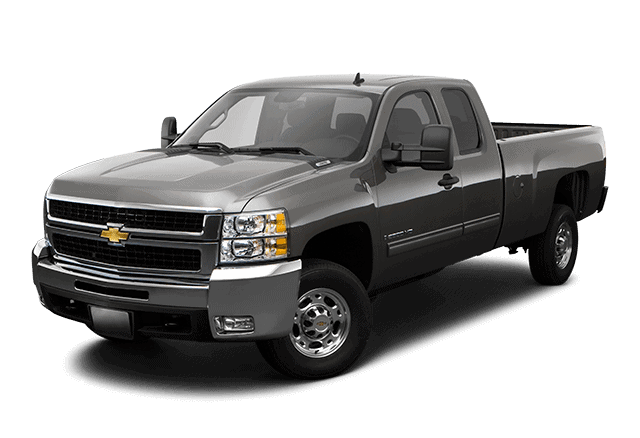
| Models: | 2007-2009 Chevrolet Silverado |
| 2007-2009 GMC Sierra | |
| Currently or Previously Registered in Alaska, Connecticut, Delaware, District of Columbia, Illinois, Indiana, Iowa, Maine, Maryland, Massachusetts, Michigan, Minnesota, Missouri, New Hampshire, New Jersey, New York, Ohio, Pennsylvania, Rhode Island, Vermont, West Virginia, Wisconsin |
This bulletin has been revised to clarify step 5 of the service procedure. Please discard all copies of bulletin 09184B.
Condition
Certain 2007-2009 model year Chevrolet Silverado and GMC Sierra vehicles currently or previously registered in Alaska, Connecticut, Delaware, District of Columbia, Illinois, Indiana, Iowa, Maine, Maryland, Massachusetts, Michigan, Minnesota, Missouri, New Hampshire, New Jersey, New York, Ohio, Pennsylvania, Rhode Island, Vermont, West Virginia, and Wisconsin may have a condition in which the sensing and diagnostic module (SDM) may corrode due to a significant quantity of snow and/or water containing road salt or other contaminants entering the vehicle and saturating the acoustical padding beneath the carpet. The SDM is located under the driver’s seat beneath the acoustical padding. If sufficient moisture collects and is retained in the padding, it may cause excessive corrosion under the SDM that could compromise the module seal and allow water intrusion that could result in SDM malfunction. If this condition exists, the airbag readiness light or a “Service Airbag” message on the Driver Information Center (DIC) may illuminate. In rare cases, the vehicle may contact OnStar and the seat belt pretensioners or front airbags may deploy.
Correction
Dealers are to remove the acoustical pad above the SDM, inspect the SDM, and replace the SDM, if necessary.
Vehicles Involved
All involved vehicles are identified by Vehicle Identification Number on the Investigate Vehicle History screen in GM Global Warranty Management system. Dealership service personnel should always check this site to confirm vehicle involvement prior to beginning any required inspections and/or repairs. It is important to routinely use this tool to verify eligibility because not all similar vehicles may be involved regardless of description or option content.
For dealers with involved vehicles, a listing with involved vehicles containing the complete vehicle identification number, customer name, and address information has been prepared and will be provided to dealers through the GM GlobalConnect Recall Reports. Dealers will not have a report available if they have no involved vehicles currently assigned.
The listing may contain customer names and addresses obtained from Motor Vehicle Registration Records. The use of such motor vehicle registration data for any purpose other than follow-up necessary to complete this program is a violation of law in several states/provinces/countries. Accordingly, you are urged to limit the use of this report to the follow-up necessary to complete this program.
Parts Information
Parts required to complete this program are to be obtained from General Motors Customer Care and Aftersales (GMCC&A). Please refer to your “involved vehicles listing” before ordering parts. Normal orders should be placed on a DRO = Daily Replenishment Order. In an emergency situation, parts should be ordered on a CSO = Customer Special Order.
Important: It is estimated that only 0.5% of involved vehicles will require an airbag sensing and diagnostic module (SDM) replacement. Please order parts accordingly.
| Part Number | Description | Quantity/ Vehicle |
| * | Airbag Sensing and Diagnostic Module (if required) | 1 |
*Refer to the vehicle identification number (VIN) and GM Electronic Parts Catalog (EPC) to order an airbag sensing and diagnostic module.
Service Procedure
- Determine if the airbag sensing and diagnostic module (SDM) requires replacement using the appropriate diagnostic information in SI and a scan tool. Check for airbag diagnostic trouble codes or an airbag readiness light on the instrument panel cluster.
- If the vehicle is equipped with vinyl flooring and there is no cutout flap or slit under the driver’s seat, no further action is required unless the SDM requires replacement. Refer to steps 6 and 7 if the vehicle is equipped with vinyl flooring and the SDM requires replacement. For all other vehicles, proceed to step 3.
Note: Driver seat removal is NOT required for crew cab or extended cab vehicles. Certain 2009 regular cab vehicles built after approximately March 1, 2009 with carpet that has a 2-sided cutout over the SDM, however, will require driver seat removal. Refer to Front Seat Replacement-Bucket in SI. After the seat removal, proceed to step 4 in the bulletin. Regular cab vehicles with carpet that has a 3-sided cut over the SDM do NOT require seat removal.
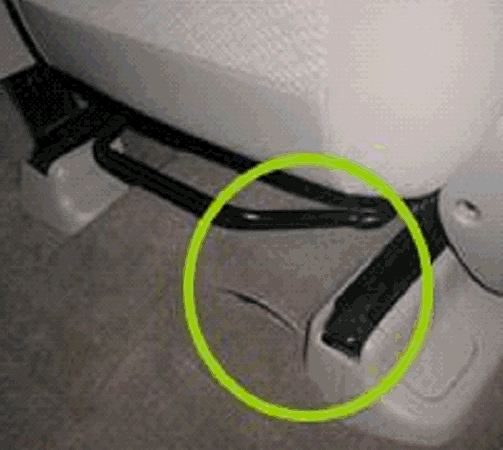
- Move the driver’s seat to the full forward or rearward position.
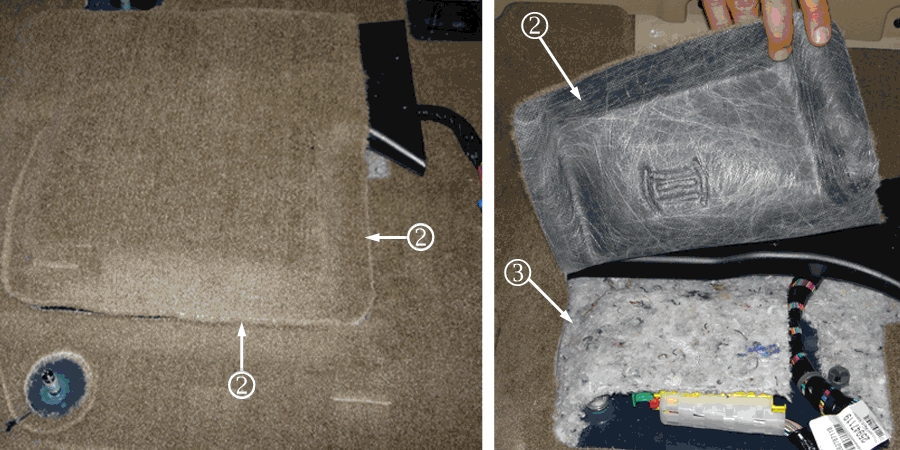
Note: Carpet and cutout flap (2) shown with the driver’s seat removed from the vehicle for illustration purposes only. Seat removal is NOT required to gain access to the acoustical pad (3).
Note: If there is no cutout flap or slit on the vinyl flooring, no further action is required unless the SDM requires replacement. If the vehicle is equipped with vinyl flooring with a slit only, insert your hand into the slit and tear out all of the acoustical pad (3) over the top of the SDM.
- Lift the cutout flap (2) in the carpet or vinyl to gain access to the acoustical pad (3) that covers the SDM.
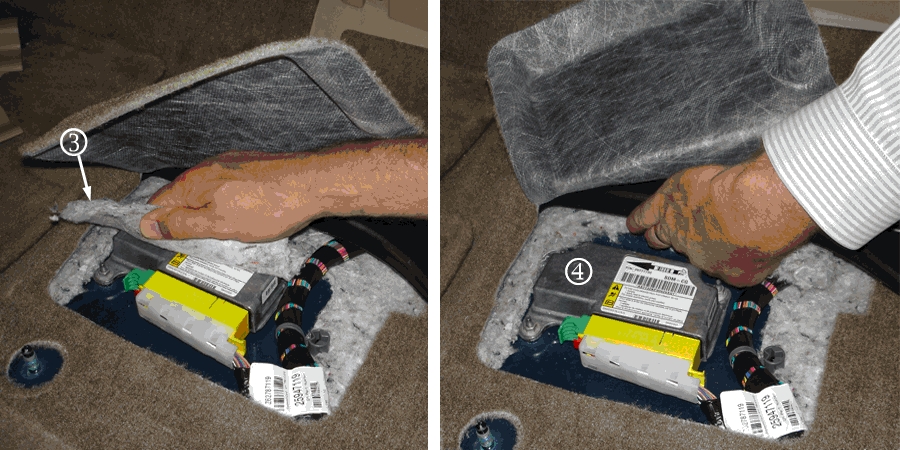
Note: Seat removed for illustration purposes only
- Using your hand, tear away and remove the acoustical pad (3) that covers the SDM (4). Ensure that there is at least a minimum of 13mm (1/2 inch) clearance between the padding to the SDM (4) and no acoustical pad remains over, or in contact with, the SDM (4).
Note: If vehicles equipped with vinyl flooring without a cutout flap or slit require an SDM replacement, remove the front driver seat and lift up the vinyl flooring to gain access to the SDM. Refer to Front Seat Replacement-Bucket in SI. Remove the acoustical pad that covers the SDM BEFORE installing the new SDM.
- Remove the SDM. Refer to Airbag Sensing and Diagnostic Module Replacement in SI.
- Install a new SDM. Refer to Airbag Sensing and Diagnostic Module Replacement in SI.
- Lower the carpet or vinyl cutout flap over SDM (4) and adjust the driver’s seat to the customer-desired position.
Customer Reimbursement
Customer requests for reimbursement of previously paid repairs for the recall condition are to be submitted to the dealer by November 30, 2015, unless otherwise specified by state law. If this is not convenient for the customer, they may mail the completed Customer Reimbursement Request Form and all required documents to the GM Customer Assistance Center.
All reasonable and customary costs to correct the condition described in this bulletin should be considered for reimbursement. Any questions or concerns should be reviewed with your GM representative prior to processing the request.
When a customer requests reimbursement, they must provide the following:
- A completed Customer Reimbursement Request Form. This form is mailed to the customer or can be obtained through GM GlobalConnect.
- The name and address of the person who paid for the repair.
- Paid receipt confirming the amount of the repair expense, a description of the repair, and the person or entity performing the repair.
Important: GM requires dealers to approve or deny a reimbursement request within 30 days of receipt. If a reimbursement request is approved, the dealer should immediately issue a check to the customer and submit an appropriate warranty transaction for the incurred expense. If a reimbursement request is denied, the dealer MUST provide the customer with a clear and concise explanation, in writing, as to why the request was denied. The bottom portion of the Customer Reimbursement Request Form may be used for this purpose. If the denial was due to missing documents, the customer can resubmit the request when the missing documents are obtained, as long as it is still within the allowed reimbursement period.
Warranty transactions for customer reimbursement of previously paid repairs are to be submitted as required by GM Global Warranty Management. Additional information can also be found in Warranty Administration Bulletin 11-00-89-004.
Warranty Transaction nformation
Submit a transaction using the table below. All transactions should be submitted as a ZFAT transaction type, unless noted otherwise.
Note: To avoid having to “H” route the customer reimbursement for approval, it must be submitted prior to the repair transaction.
| Labor Code | Description | Labor Time | Net Item |
| V2133 | Remove Acoustical Pad from the SDM Area | 0.2 | N/A |
| Add: Seat Removal (Regular Cab with 2-Sided Cutout Only) (Vehicles built after approximately March 1, 2009) |
0.3
0.3 |
||
| V2156 | Inspect – No Further Action Required – Vinyl Flooring with No Cutout Flap | 0.2
0.3 |
N/A |
| 9101082 | Remove Acoustical Pad from the SDM Area Replace SDM (includes SDM inspection)
Add: Seat Removal (Regular Cab with 2-Sided Cutout Only or Vehicles Equipped with Vinyl Flooring Without Cutout Flap or Slit) |
1.2
0.3 |
N/A |
| 9101087 | Customer Reimbursement Approved | 0.2 | * |
| 9101088 | Customer Reimbursement Denied – For US dealers only | 0.1 | N/A |
Note: Customer reimbursement will not close this program. The service procedure must also be performed on the vehicle.
* The amount identified in “Net Item” should represent the dollar amount reimbursed to the customer.
Customer Notification
General Motors will notify customers of this program on their vehicle (see copy of customer letter included with this bulletin).
Dealer Program Responsibility
All unsold new vehicles in dealers’ possession and subject to this program must be held and inspected/repaired per the service procedure of this program bulletin before customers take possession of these vehicles.
Dealers are to service all vehicles subject to this program at no charge to customers, regardless of mileage, age of vehicle, or ownership, from this time forward.
Customers who have recently purchased vehicles sold from your vehicle inventory, and for which there is no customer information indicated on the involved vehicle listing, are to be contacted by the dealer. Arrangements are to be made to make the required correction according to the instructions contained in this bulletin. A copy of the customer letter is provided in this bulletin for your use in contacting customers. Program follow-up cards should not be used for this purpose, since the customer may not as yet have received the notification letter.
In summary, whenever a vehicle subject to this program enters your vehicle inventory, or is in your facility for service in the future, you must take the steps necessary to be sure the program correction has been made before selling or releasing the vehicle.
Dear General Motors Customer:
We have learned that your 2007, 2008, or 2009 model year Chevrolet Silverado or GMC Sierra, currently or previously registered in Alaska, Connecticut, Delaware, District of Columbia, Illinois, Indiana, Iowa, Maine, Maryland, Massachusetts, Michigan, Minnesota, Missouri, New Hampshire, New Jersey, New York, Ohio, Pennsylvania, Rhode Island, Vermont, West Virginia, and Wisconsin may have a condition in which the sensing and diagnostic module (SDM) may corrode due to a significant quantity of snow and/or water containing road salt or other contaminants entering the vehicle and saturating the acoustical padding beneath the carpet. The SDM is located under the driver’s seat beneath the acoustical padding. If sufficient moisture collects and is retained in the padding, it may cause excessive corrosion under the SDM that could compromise the module seal and allow water intrusion that could result in SDM malfunction. If this condition exists, the airbag readiness light or a “Service Airbag” message on the Driver Information Center (DIC) may illuminate. In rare cases, the vehicle may contact OnStar and the seat belt pretensioners or front airbags may deploy.
Your satisfaction with your 2007, 2008, or 2009 model year Chevrolet Silverado or GMC Sierra is very important to us, so we are announcing a program to prevent this condition.
What We Will Do: Your dealer will remove the acoustical pad above the SDM, inspect the SDM, and replace the SDM, if necessary. This service will be performed for you at no charge at no charge.
What You Should Do: To limit any possible inconvenience, we recommend that you contact your dealer as soon as possible to schedule an appointment for this repair.
Reimbursement: Even though you may have already had repairs for this condition, you will still need to take your vehicle to your dealer for additional repairs. If you have paid for repairs for the condition described in this letter, please complete the enclosed reimbursement form and present it to your dealer with all required documents. Working with your dealer will expedite your request, however, if this is not convenient, you may mail the completed reimbursement form and all required documents to Reimbursement Department, PO Box 33170, Detroit, MI 48232-5170. The completed form and required documents must be presented to your dealer or received by the Reimbursement Department by November 30, 2015, unless state law specifies a longer reimbursement period.
If you have any questions or concerns that your dealer is unable to resolve, please contact the appropriate Customer Assistance Center at the number listed below.
| Division | Number | Text Telephones (TTY) |
| Chevrolet | 1-800-222-1020 | 1-800-833-2438 |
| GMC | 1-800-462-8782 | 1-888-889-2438 |
| Guam | 65-6267-1752 | |
| Puerto Rico – English | 1-800-496-9992 | |
| Puerto Rico – Español | 1-800-496-9993 | |
| Virgin Islands | 1-800-496-9994 |
We sincerely regret any inconvenience or concern that this situation may cause you. We want you to know that we will do our best, throughout your ownership experience, to ensure that your GM vehicle provides you many miles of enjoyable driving.
Alicia S. Boler-Davis
Sr. Vice President
Global Quality & Customer Experience
Enclosure
09184B
SEOCONTENT-END
Bulletin No.: 09184C
Date: December 2015
To View or Download this Document Click Here
Bulletin No.: 09184C
Date: December 2015
To View or Download this Document Click Here
Bulletin No.: 09184C
Date: December 2015
To View or Download this Document Click Here
Bulletin No.: 09184B
Date: November 2014
To View or Download this Document Click Here
Bulletin No.: 09184B
Date: November 2014
To View or Download this Document Click Here
Bulletin No.: 09184B
Date: November 2014
To View or Download this Document Click Here
Bulletin No.: 09184B
Bulletin No.: 09184A
Date: October 2009
To View or Download this Document Click Here
Bulletin No.: 09184A
Reprogramming
GM Diagnostic/Programming (TIS2Web)
Approved J2534 Device with TIS2WEB can reprogram 1996 and later All GM Modules.
To obtain the latest electronic controller calibration information for your vehicle, go to https://tis2web.service.gm.com/tis2web and enter the vehicle's 17 character Vehicle Identification Number (VIN) and select 'Get CAL ID’.
You can then compare the latest part number with the actual number installed on the vehicle to determine if a reprogram is needed.
The Service Programming System (SPS) application is part of the TIS2Web system. To program an ECU, the SPS application must communicate with the vehicle control modules using the proper J2534 programming interface tool.
The Tech 2 supports model years 1996 and beyond. With the addition of the CAN Diagnostic Interface (CANdi) module, Tech 2 is fully backward compatible with current Tech 2 functionality and operates transparently when diagnosing non-CAN-equipped vehicles.
Servicing the next generation Global A vehicles will require the diagnostic software, GDS2, Global Diagnostic System 2 running on a local PC device while the MDI is connected to the vehicle. The GM MDI is the Global Diagnostic tool for future vehicles starting with Global A vehicles.
The GM MDI was introduced in the fall of 2007 for Pass-Thru programming and offers faster programming speed. It can be used to perform Pass-Thru programming on all vehicles built since 1996 and into the future. Click here to view a list of GDS supported vehicles.

- J2534 Pass-Thru Programmer: TOPDON RLink J2534 is an advanced diagnostic and reprogramming tool that support all J2534 protocols, as well as D-PDU, CAN-FD and DoIP, ensuring compatibility with a wide range of modern vehicles. It offers extensive versatility with support for over 18 major automotive brands, including Chrysler, Ford, GM, Nissan, Toyota, Honda, Subaru, Land Rover/Jaguar, Volvo, Wuling, Volkswagen/Audi, Mercedes-Benz, and BMW. NOTE: Not compatible with Ford IDS diagnostic software
- All-in-One OEM Diagnostics: This J2534 ECU programming tool elevates your automotive repair capabilities to new heights by delivering complete OEM diagnosis. Boasting comprehensive full-system diagnostics, intuitive repair guides, advanced ECU programming and coding, common reset services, a vast library of repair information and more, this all-in-one solution empowers technicians to effortlessly tackle complex vehicle issues with ease. *Not compatible with 24V vehicles
- Proven Performance You Can Trust: Backed by over 10000 real vehicle tests and benefit from a wealth of practical experience, this OEM reprogramming tool guarantees stable and exceptional performance. Supported by TOPDON's dedicated technical experts with in-depth knowledge of both auto repair and J2534 Pass-Thru programming, the RLink J2534 provides prompt and professional assistance, ensuring a smooth setup and reliable compatibility
- Integrated Excellence, Always Up-to-Date: Featuring the exclusive RLink Platform to provide a streamlined experience with one-click driver installation and management, ensuring flawless integration with your OE software, maintaining the original performance quality. The built-in operation guide makes mastering OE software quick and easy, so you can get started right away. Plus, with lifetime free updates, your diagnostics will stay current with the latest drivers and innovations
- Efficiency Meets Versatility: Engineered to support three CAN channels simultaneously - CAN FD and CAN-CC included, giving you the edge in fast troubleshooting. To perfectly synchronized with the OE software, please diagnose with active subscriptions and make sure your computer system is running a compatible 64-bit Windows version (7, 8, 10 or later) to fully leverage the power of RLink J2534. *We don't provide extra OE software

- Advanced VCI Box, Industry-leading J2534 Pass-Thru Technology: This J2534 Pass-Thru Programmer is designed espically for technicians, independent shop owners, and DIY enthusiasts, enables fast, reliable computer-based programming. It supports all J2534 protocols—including the latest DoIP and CAN FD—ensuring full compatibility with both legacy and next-generation vehicles.
- High-Speed OEM-Level Diagnostics & Programming: Unlock true OEM functionality with comprehensive system diagnostics, guided troubleshooting, coding, adaptations, resets, and programming—all designed to slash repair time. This all-in-one tool eliminates the need for multiple OEM devices, boosting efficiency and cutting costs. Equipped with High-Speed USB, it delivers 10x more data per second than competing solutions
- Coverage for 17 Car Brands & Ultra Reliability: Works seamlessly for Chrysler, for Ford(Forscan), for GM, for Nissan, for Toyota, for Honda, for Subaru(SSM4), for Land Rover/Jaguar, for Volvo, for Wuling, for Volkswagen, for Mercedes-Benz, and for BMW. Backed by over 10000 real vehicle tests and benefit from a wealth of practical experience, this OEM reprogramming tool guarantees stable and exceptional performance
- User-Friendly RLink Platform & Expert Support: TOPDON’s proprietary driver management platform offers a clean interface and lifetime free updates. Access a rich library of real-world case studies to stay ahead of the curve. Backed by a support team with 10+ years of J2534 and automotive repair experience, we provide one-on-one assistance to resolve any technical issue.
- 6.6 ft USB-C Cable & Portable Storage Case: The RLink J2534 diagnostic tool features a 6.6ft USB 2.0 Cable and a 1.2 ft OBDII Extension Cable, allows to connection your computer easily outside the vehicle. The included handled carry case offers easy portability, storage, and hanging options—keeping your gear clean and ready to go, anywhere.

- Dual WiFi & 10.1" Touchscreen: Provides a stable, high-speed wireless link 3x faster than bluetooth, and a responsive, professional interface. Topdon ONE obd2 scanner diagnostic tool ensures smooth, non-lagging diagnostic scan, boosting mechanic efficiency
- J2534 Pass-Thru Support: The included ONE VCI supports the J2534 standard, allowing it to function as a pass-thru device when paired with OEM diagnostic software.Through TOPDON’s RLink platform, technicians can perform dealer-level coding, expanding in-house capabilities without investing in multiple factory automotive scan tools
- OE Topology Mapping: Visualize the vehicle’s ECU network exactly as it’s built.Zoom, pan, and highlight specific modules to pinpoint component issues with precision.Topology mapping displays real-time communication between modules
- 50+ Service Functions: Covers high-demand services like ADAS calibration, DPF regen, TPMS reset, ABS bleed, and throttle adaptation.Expands your service menu, allows you to charge premium rates, and turns away zero jobs due to lack of tooling. Vehicle-specific functionality may vary
- Advaned ECU Coding: 10 of the most serviced brands in North America, including full ECU coding and flash hidden support for BMW, VW, Au-di, Benz, Porsche, Toyota, Ni ssan and more. Enables module replacement, feature customization, and personal settings with automatic backup or restore.Lets your shop safely offer high-margin customization services, attracting more customers and boosting profit
This product presentation was made with AAWP plugin.