
NHTSA ID Number: 10219284
Manufacturer Communication Number: 18-NA-306
Summary
This Warranty Administration service bulletin provides information for dealers/Service advisors on when and how to submit a Pre-Repair Authorization (PRA).
746 Affected Products
Vehicles
| MAKE | MODEL | YEAR |
| BUICK | CASCADA | 2016-2019 |
| BUICK | ENCLAVE | 2011-2023 |
| BUICK | ENCORE | 2013-2022 |
| BUICK | ENCORE GX | 2020-2022 |
| BUICK | ENVISION | 2016-2022 |
| BUICK | LACROSSE | 2011-2020 |
| BUICK | LESABRE | 2013 |
| BUICK | LUCERNE | 2011-2012 |
| BUICK | REGAL | 2011-2020 |
| BUICK | REGAL TOURX | 2018 |
| BUICK | VERANO | 2012-2017 |
| CADILLAC | ATS | 2013-2019 |
| CADILLAC | ATS-V | 2015-2018 |
| CADILLAC | CT4 | 2020-2022 |
| CADILLAC | CT5 | 2020-2022 |
| CADILLAC | CT6 | 2013-2021 |
| CADILLAC | CTS | 2011-2019 |
| CADILLAC | CTS-V | 2011-2012, 2014-2016, 2018 |
| CADILLAC | DTS | 2011-2012 |
| CADILLAC | ELR | 2014-2017 |
| CADILLAC | ESCALADE | 2011-2022 |
| CADILLAC | ESCALADE ESV | 2011-2022 |
| CADILLAC | ESCALADE EXT | 2011-2014 |
| CADILLAC | ESCALADE EXT 1500 | 2011 |
| CADILLAC | ESCALADE HYBRID | 2011-2014 |
| CADILLAC | LYRIQ | 2023 |
| CADILLAC | SRX | 2011-2019 |
| CADILLAC | STS | 2011-2012 |
| CADILLAC | XT4 | 2019-2022 |
| CADILLAC | XT5 | 2013-2023 |
| CADILLAC | XT6 | 2020-2023 |
| CADILLAC | XTS | 2013-2020 |
| CHEVROLET | 3500 | 2014-2022 |
| CHEVROLET | 4500 | 2016-2020, 2022 |
| CHEVROLET | 4500HD | 2017-2022 |
| CHEVROLET | 5500HD | 2017-2022 |
| CHEVROLET | 6500HD | 2022 |
| CHEVROLET | AVALANCHE | 2011-2014 |
| CHEVROLET | AVALANCHE 1500 | 2011-2013 |
| CHEVROLET | AVALANCHE 2500 | 2013 |
| CHEVROLET | AVEO | 2011-2018 |
| CHEVROLET | BLAZER | 2019-2023 |
| CHEVROLET | BOLT EUV | 2022-2023 |
| CHEVROLET | BOLT EV | 2017-2023 |
| CHEVROLET | C3500 | 2018 |
| CHEVROLET | CAMARO | 2011-2023 |
| CHEVROLET | CAPRICE | 2011-2018 |
| CHEVROLET | CAPRICE POLICE PURSUIT | 2012-2017 |
| CHEVROLET | CAPTIVA | 2011-2018 |
| CHEVROLET | CAPTIVA SPORT | 2011-2012 |
| CHEVROLET | CHEYENNE | 2017 |
| CHEVROLET | CITY EXPRESS | 2015-2018 |
| CHEVROLET | COBALT | 2011-2017 |
| CHEVROLET | COLORADO | 2011-2022 |
| CHEVROLET | CORVETTE | 2011-2023 |
| CHEVROLET | CRUZE | 2011-2019 |
| CHEVROLET | EQUINOX | 2011-2022 |
| CHEVROLET | EXPRESS | 2011-2022 |
| CHEVROLET | EXPRESS 1500 | 2011-2012, 2014 |
| CHEVROLET | EXPRESS 2500 | 2011, 2014 |
| CHEVROLET | EXPRESS 3500 | 2012, 2014 |
| CHEVROLET | EXPRESS 4500 | 2012, 2014, 2016 |
| CHEVROLET | EXPRESS CUTAWAY | 2013 |
| CHEVROLET | G VAN BUS | 2011 |
| CHEVROLET | G4500 | 2018 |
| CHEVROLET | HHR | 2011 |
| CHEVROLET | IMPALA | 2011-2020 |
| CHEVROLET | LUMINA | 2014 |
| CHEVROLET | MALIBU | 2011-2022 |
| CHEVROLET | MALIBU ECO | 2013-2014 |
| CHEVROLET | MALIBU HYBRID | 2016-2019 |
| CHEVROLET | N300 | 2014-2016, 2018 |
| CHEVROLET | N300 MAX | 2017 |
| CHEVROLET | OPTRA | 2016 |
| CHEVROLET | ORLANDO | 2017 |
| CHEVROLET | S10 | 2016-2018 |
| CHEVROLET | SILVERADO 1500 | 2011-2023 |
| CHEVROLET | SILVERADO 2500 | 2011-2023 |
| CHEVROLET | SILVERADO 3500 | 2011-2023 |
| CHEVROLET | SILVERADO 4500HD | 2019-2023 |
| CHEVROLET | SILVERADO 5500HD | 2019-2023 |
| CHEVROLET | SILVERADO 6500HD | 2019-2023 |
| CHEVROLET | SONIC | 2011-2020 |
| CHEVROLET | SPARK | 2013-2022 |
| CHEVROLET | SPARK EV | 2014-2017 |
| CHEVROLET | SS | 2014-2018 |
| CHEVROLET | SUBURBAN | 2011-2022 |
| CHEVROLET | SUBURBAN 1500 | 2011, 2021-2022 |
| CHEVROLET | SUBURBAN 2500 | 2011 |
| CHEVROLET | TAHOE | 2011-2022 |
| CHEVROLET | TAHOE HYBRID | 2011-2013 |
| CHEVROLET | TAHOE POLICE PURSUIT | 2011-2016 |
| CHEVROLET | TRAILBLAZER | 2013-2014, 2017-2022 |
| CHEVROLET | TRAVERSE | 2011-2023 |
| CHEVROLET | TRAX | 2013-2022 |
| CHEVROLET | VOLT | 2011-2019 |
| GMC | ACADIA | 2011-2023 |
| GMC | CANYON | 2011-2013, 2015-2022 |
| GMC | DENALI | 2011-2015 |
| GMC | ENVOY | 2011-2013 |
| GMC | G VAN BUS | 2011 |
| GMC | G3500 | 2017-2018 |
| GMC | HUMMER EV | 2022-2023 |
| GMC | SAVANA | 2011-2022 |
| GMC | SAVANA 1500 | 2011-2017 |
| GMC | SAVANA 2500 | 2011-2018 |
| GMC | SAVANA 3500 | 2011-2018 |
| GMC | SIERRA 1500 | 2011-2023 |
| GMC | SIERRA 2500 | 2011-2023 |
| GMC | SIERRA 3500 | 2011-2023 |
| GMC | SIERRA DENALI | 2011-2020 |
| GMC | TERRAIN | 2011-2022 |
| GMC | YUKON | 2011-2022 |
| GMC | YUKON DENALI | 2011-2013, 2015-2019 |
| GMC | YUKON DENALI XL | 2011-2018 |
| GMC | YUKON HYBRID | 2011-2013 |
| GMC | YUKON XL | 2011-2022 |
| GMC | YUKON XL 1500 | 2011-2012 |
| GMC | YUKON XL 2500 | 2011-2013 |
1 Associated Document
Manufacturer Communications
Bulletin No.: 18-NA-306
Date: August, 2022
NHTSA ID Number: 10199235
Manufacturer Communication Number: 18NA306
Summary
This Warranty Administration bulletin provides information for dealers/Service advisors on when and how to submit a Pre-Repair Authorization (PRA).
1 Associated Document
Manufacturer Communications
Bulletin No.: 18-NA-306
Date: May, 2021
MC-10199235-9999.pdf 448.802KB
NHTSA ID Number: 10198844
Manufacturer Communication Number: 18NA306
Summary
This Warranty Administration bulletin provides information for dealers/Service advisors on when and how to submit a Pre-Repair Authorization (PRA).
1 Associated Document
Manufacturer Communications
Bulletin No.: 18-NA-306
Date: May, 2021
MC-10198844-9999.pdf 448.802KB
NHTSA ID Number: 10191192
Manufacturer Communication Number: 18NA306
Summary
This Warranty Administration bulletin provides information for dealers/Service advisors on when and how to submit a Pre-Repair Authorization (PRA).
1 Associated Document
Manufacturer Communications
Bulletin No.: 18-NA-306
Date: April, 2021
NHTSA ID Number: 10187379
Manufacturer Communication Number: 18NA306
Summary
This Warranty Administration bulletin provides information for dealers/Service advisors on when and how to submit a Pre-Repair Authorization (PRA).
1 Associated Document
Manufacturer Communications
Bulletin No.: 18-NA-306
Date: December, 2020
MC-10187379-9999.pdf 442.584KB
NHTSA ID Number: 10186065
Manufacturer Communication Number: 18NA306
Summary
This Warranty Administration bulletin provides information for dealers/Service advisors on when and how to submit a Pre-Repair Authorization (PRA).
1 Associated Document
Manufacturer Communications
Bulletin No.: 18-NA-306
Date: December, 2020
MC-10186065-9999.pdf 442.584KB
NHTSA ID Number: 10181675
Manufacturer Communication Number: 18NA306
Summary
This Warranty Administration bulletin provides information for dealers/Service advisors on when and how to submit a Pre-Repair Authorization (PRA) (US dealers only).
1 Associated Document
Manufacturer Communications
Bulletin No.: 18-NA-306
Date: October, 2020
MC-10181675-9999.pdf 518.068KB
NHTSA ID Number: 10171888
Manufacturer Communication Number: 18NA306
Summary
This Warranty Administration bulletin provides information for dealers/Service advisors on when and how to submit a Pre-Repair Authorization (PRA) (US dealers only).
1 Associated Document
Manufacturer Communications
Bulletin No.: 18-NA-306
Date: January, 2020
MC-10171888-9999.pdf 448.411KB
NHTSA ID Number: 10168188
Manufacturer Communication Number: 18NA306
Summary
This Warranty Administration bulletin provides information for dealers/Service advisors on when and how to submit a Pre-Repair Authorization (PRA) (US dealers only).
1 Associated Document
Manufacturer Communications
Bulletin No.: 18-NA-306
Date: October, 2019
MC-10168188-9999.pdf 902.456KB

- [Easy to Use—Work Out of the Box] + [FOXWELL 2026 New Version] FOXWELL NT604 Elite scan tool is the 2026 new version from FOXWELL, designed for car owners who want to figure out the cause of issues before fixing car problems by scanning common systems like ABS, SRS, engine, and transmission. The NT604 Elite obd2 scanner diagnostic tool comes with the latest software—no need to waste time downloading software first. Plug the scanner into the OBDII port with OBDII cable to start the diagnosis.
- [Affordable] + [Reliable Car Health Monitor] Will you be confused what happens when the warning light of ABS/SRS/transmission/check engine flashes? Instead of taking your cars to dealership, this FOXWELL scanner will help you do a thorough scanning and detection for your cars and pinpoint the root cause. Note:The device is a diagnostic tool, not a repair tool. To turn off a warning light, you must first physically repair the issue causing it. Only then can the scanner be used to clear the corresponding fault code.
- [5 in 1 Car Diagnostic Scanner] Compared with obd scanners (50-100), NT604 Elite code scanner not only includes their OBDII diagnosis but also serves as ABS/SRS scanner, transmission and check engine code reader. When it’s an odb2 scanner, you can use it to check if your car is ready for annual test through I/M readiness menu. In addition, live data stream, built-in DTC library, data play back and print, all these features are a big plus for it. Note: doesn't support maintenance functions like reset or relearn. For the SRS system, NT604 Elite can read and clear common fault codes not caused by a crash, but crash/collision data cannot be cleared.
- [Fantastic AUTOVIN] + [No extra software fee] Through the AUTOVIN menu, this NT604 Elite car scanner allows you to get your V-IN and vehicle info rapidly, no need to take time to find your V-IN and input one by one. What's more, the NT604 Elite ABS SRS scanner supports 60+ car brands from worldwide (America/Asia/Europe). You don’t need to pay extra software fee. AUTOVIN may not work on some older vehicles or certain vehicle brands. If AUTOVIN fails, please input the vin code manually or go to the Diagnostic Menu to select your vehicle model.
- [Solid protective case KO plastic carrying bag] + [Lifetime update] Almost all same price-level car scanner diagnostic tool only offers plastic bag to hold the scanner.However, NT604 Elite automotive scanner is equipped with solid protective case, preventing your obd2 scanner from damage. Then you don’t need to pay extra money to buy a solid toolbox.

- OBD2 SCANNER FOR ALL SYSTEMS – The INNOVA SD35 is a tablet-based OBD2 scanner designed for advanced diagnostics. Read and clear check engine light, ABS, SRS, and TPMS codes, plus test your car battery and alternator to prevent unexpected failures. Vehicle coverage may vary. Please use Innova’s Coverage Checker to verify compatibility.
- ALL-SYSTEM DIAGNOSTICS & LIVE DATA – Unlike basic code readers, this OBD2 scanner for all vehicles scans engine, transmission, ABS, SRS, and more. Get real-time live data, including RPM, fuel trims, temperature readings, and oxygen sensor performance.
- OBD2 TABLET WITH USER-FRIENDLY INTERFACE – This automotive scan tool features a high-resolution display, making vehicle diagnostics faster and easier.
- ADVANCED TPMS, OIL RESET & SERVICE FUNCTIONS – Perform TPMS sensor checks, oil light reset, and other service resets with ease This professional diagnostic tool provides comprehensive vehicle maintenance capabilities in one device.
- WIDE VEHICLE COVERAGE (1996 & NEWER CARS & TRUCKS) – This OBD2 scanner Bluetooth tablet is compatible with Toyota, Ford, Honda, Chevrolet, Nissan, Dodge, and more. However, feature coverage may vary. Please use Innova's Coverage Checker to verify coverage.

- [All System Diagnostics, Professional-Level Scanner] - BLCKTEC 460T is the ultimate OBD2 diagnostic tool for home mechanics and professionals. It supports all 10 OBD2 modes, reads and clears Engine/Transmission/ABS/SRS codes, performs All-System Diagnostics, offers workshop reset tools, and provides real-time live data. It helps you pinpoint issues, assess your car's condition, and prepare for SMOG checks with ease. NOTE: Function availability depends on your vehicle. Before you buy, be sure to use the Compatibility Checker on BLCKTEC website or contact our customer support to verify that the features you need are supported for your vehicle’s specific year, make, and model.
- [12+ Most Popular Reset Functions] - BLCKTEC 460T OBD2 scanner offers 12+ dealer-level service functions, including Oil Maintenance Reset, ABS Bleeding, EPB Reset, SAS(Steering Angle Sensor) Recalibration, DPF(Diesel Particulate Filter) Reset, Throttle Body Relearn, Battery Reset/Initialization, TPMS Relearn, Transmission Reset, Fluid Change Reset, Maintenance Reset and more, enabling you to perform workshop services like a pro. NOTE: Function availability depends on your vehicle. Be sure to use the Compatibility Checker on BLCKTEC website to verify that the features you need are supported for your vehicle.
- [Real-Time OBD2 and OEM Live Data, Freeze Frame Data] - BLCKTEC 460T helps diagnose vehicle issues when warning lights like Check Engine Light or ABS/SRS Light appear. It offers detailed DTC info, ECU Freeze Frame Data, and real-time OBD2 and advanced OEM live data, including Engine, Transmission, ABS, SRS, and more, making it easy to diagnose and resolve vehicle problems. You can view, graph, record, replay, and overlay up to four live data streams in a single graph for better analysis.
- [AutoVIN, AutoReLink, AutoScan, 3X Faster] - Equipped with AutoVIN technology, 460T automatically retrieves the VIN to save you time. Its AutoScan and AutoReLink features scan all of the vehicle's ECUs and detect any fault codes immediately after you plug the scanner into the vehicle's OBD2 port - no button presses required. Additionally, it regathers DTC and I/M readiness information every 30 seconds, simplifying monitor tests. 460T's advanced technology makes it 3X faster than other products.
- [Get RepairSolutions2, the #1 Auto Repair App for Free] - When paired with RepairSolutions2(RS2) App, 460T becomes even more powerful. RS2's Verified Fix Database built by master technicians, provides the parts needed for the repair. Additionally, RS2 gives you access to OEM warranty info, maintenance schedules, TSB, and dealership recall info, making car care easier than ever. RS2 is free with no subscription fees and it stores your car scan reports in the cloud, allowing you to access, share, or print them anytime and anywhere.
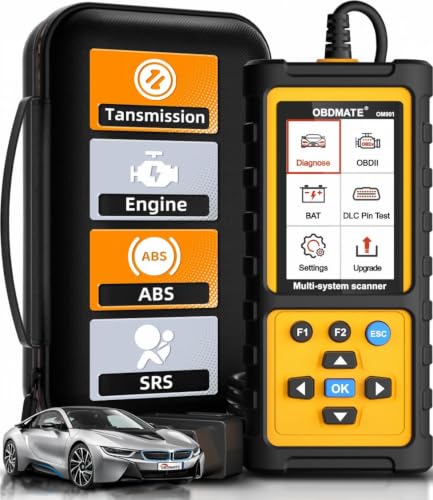
- 【Reset ABS/SRS/Transmission/Engine Lights】 More than an check engine code reader, OBDMATE OM901 obd2 scanner performs comprehensive diagnostics for the 4 most-used systems (ABS/SRS/Engine/Transmission). It quickly clears fault codes, turns off warning lights, read data stream and auto VIN.
- 【3.5" Handheld Scanner with 4 System Diagnose】 3.5" Super large TFT screen equipped displays an intuitive menu and clear readings of various sensors from ABS, SRS, ECM and TCM systems. It arrived with a silicone protective case and hard-shell carrying case, ensuring long-lived durability and drop resistance. The car diagnostic tool is plug-to-play designed, plug it and get diagnosis started without any batteries or updates required.
- 【One-Click I/M Readines&Full OBD2 Functions】 Press F1 to get an intuitive corloured form about whether various emissions-related systems on the vehicle are operating properly. Help you get smog-check ready quickly. OM901 car scanner supports all essential OBD2 functions you need: read & clear codes, view freeze frame, read I/M readiness, retrieve VIN, live data stream (with graphing display), O2 sensor test, onboard monitoring mode, and EVAP leak test.
- 【Battery Voltage Check&DLC Pin Test】 It allows you to monitor battery health by testing current battery voltage. Plus, this obd2 diagnostic tool features DLC 16-PIN test to check current voltage of every pin.
- 【Automotive Scanner Diagnostic Kit】 The package comes with 1 car scanner, 1 USB-type c cable, 1 hard storage bag and 1 user manual(en). Free to update without any hidden fees. 5 languanges available in setting including English, French, Italian, German and Espanish. Valuable and Portable, making it a great tool kit for car owners, DIY enthusiasts, and professional mechanics.

- [Diagnose Like a Pro] BlueDriver Pro is a professional OBD2 scanner and diagnostic tool that helps you scan, understand, and clear vehicle trouble codes with confidence. Turn your phone into a powerful car diagnostic scanner—no guesswork, no unnecessary repairs.
- [Read and Clear More Codes Than Ever] Read and clear more codes than basic car code readers. Access enhanced diagnostics for Check Engine, ABS, SRS, Airbag, TPMS, Transmission.
- [Verified Fixes and Real-Time Data] Get unlimited, technician-verified repair reports matched to your VIN, with definitions, causes, and confirmed fixes. Monitor live vehicle data as you drive, view freeze frames, check smog readiness, and analyze Mode 6 test results.
- [Wireless & Bluetooth Enabled] - Say goodbye to wires. BlueDriver connects with Bluetooth via your phone/tablet to a sensor that plugs into your car's OBDII port. Get all of the capabilities of an expensive code reader & scan tool without any annoying wires.
- [Broad Make & Model Coverage] Strong support for GM, Ford, Stellantis (RAM, Jeep, Chrysler), Toyota, Honda, Nissan, Mazda, Subaru, Hyundai, Mercedes-Benz, BMW, and VW.
SEOCONTENT-START
Copyright 2022 General Motors LLC. All Rights Reserved. Service Bulletin Bulletin No.: 18-NA-306 Date: August, 2022 WARRANTYADMINISTRATION Subject: Warranty Administration – Pre-Repair Authorization (PRA) Process and Information (U.S. and Canada Only) Brand: Model: Model Year: VIN Breakpoint: Engine: Transmission: from to from to Buick GM Passenger Cars and Light Duty Trucks 2023 and Prior — — Cadillac Chevrolet GMC Involved Region or Country United States and Canada Important: This bulletin is NOT applicable to Medium Duty Vehicles. Important: The CSMTapplication is being utilized for select field actions. Please be mindful of this when processing field action bulletins, as it will be indicated in the bulletin if it is necessary to submit via PRA, prior to claim submittal. Warranty replacement of the following components requires GM Pre-Authorization per the process described in this bulletin: • Wheels • All Seat Covers & Cushions (bottoms, backs, & connected armrests) • Outside Mirror Assemblies • Steering Wheels • Interior (Door) Trim • Select Field Actions • OEM/LPO Assist Steps • 2019 – Current Model Year Silverado 1500 & Sierra 1500 Upper Control Arms • 2019 – Current Model Year Silverado 1500 & Sierra 1500 Lower Control Arms • Drive Motor Battery Charger Cable • 2021 – Current Model Year Front Headlamps Note: Please see Components on Restriction section below for a complete list of impacted labor operations and component descriptions. This Pre-Repair Authorization (PRA) process is not required when: • The component can be repaired via refinishing or replacing a sub-component (i.e. refinishing the wheel or replacing the glass of a mirror). • If a cushion only is being replaced. • Replacing a component under policy. • Replacing a component for Customer Enthusiasm. The “Customer Enthusiasm” indicator MUST be selected on the transaction to avoid rejection of the claim. • Replacing a component due to transportation damage (ZTPT) or as part of an over-the-counter Parts Warranty (ZPTC). Only regular warranty transactions (ZREG) and dealer-installed parts warranty transactions (ZPTI) require a PRA. Note: Please refer to Service Bulletin #20-NA-159 for information on tire PRAs; tires follow a separate process and are not reviewed by the CSMT PRA team. Overview The PRA process uses an App (CSMT- Certified Service Mobile Toolbox) to submit an authorization request prior to replacing any of the components listed above under warranty. The dealer utilizes the App to submit details and photos of the condition to GM for review. Once the request is reviewed, a decision of accepted (warrantable), rejected (non-warrantable) or rework (more information required) is returned to the dealer via device push notification, as well as being documented in Global Warranty Management (GWM). The dealer is provided a pre-authorization number for each request and must include the pre-authorization number on approved warrantable claims. Note: The decision is only made on the component itself (warrantable or non-warrantable). Dealers are still responsible for claim compliancy as per Service Policies & Procedures Manual. The intent of the PRA process is to pre-screen product concerns while the customer is on the service drive to determine if the customers’ concern is warrantable. This provides up-front GM collaboration with the dealer on warranty/non-warranty decisions. If the Page 2 August, 2022 Bulletin No.: 18-NA-306 determination is not warranty, the dealership has an opportunity to immediately communicate this to the customer and provide an estimate for the repair. Pre-Repair Authorization Tool The Certified Service Mobile Toolbox (CSMT) App is required to process Pre-Repair Authorization (PRA) requests covered in this bulletin. Once the App is downloaded to your mobile device, simply click on the “PRA” category in the left-hand menu to create and submit your request. The CSMT App is free and available for use on select Android™ and Apple® operating systems including tablets and iPads. The app can be found and downloaded from the Google Play™ Store (Android) and App Store (Apple). Please note that with the large variety of phones and operating systems, not all functionality will appear/operate the same on all devices. Current operating system (OS) requirements are as follows: Apple (iPhone): iOS versions 13.6 and higher Android: OS versions 8.1 and higher If your device is not compatible, check to see if there are system updates available. Apple and Android devices unable to update to a compatible system will no longer be able to access or use the CSMTapp. Users may want to consider upgrading to a compatible device. The CSMT App may be used by any member of the dealer’s service department team as determined necessary by Service Management. Although it is recommended, it is not required by GM for Service Management to be involved in a request. To download and utilize the App: 1. Search for the CSMT (Certified Service Mobile Toolbox) within your device’s app store. 2. Download the app on to your device (phone or tablet). 3. Open the app. 4. Login to the app using your GlobalConnect ID and password. 5. Enter the user profile information. Note: You will only be asked for the user profile information upon initial log-in. User profile information can be changed at any time by going to the user profile screen available from the main menu. You only have to input this the first time you log in. Your BAC will always be tied to your GlobalConnect ID. You are now ready to begin using the app. Complete download instructions are available on the Warranty Resource Center in GlobalConnect, within the Certified Service Mobile Toolbox (CSMT) / Pre-Repair Authorizations (PRA) tile. In Canada, go to the “CSMT” tab on the Warranty Administration home page in GlobalConnect. Utilizing the App to Complete Pre-Repair Authorization Request: After confirming that a customer concern requires replacement of one of the restricted components, follow these steps to submit your Pre-Repair Authorization (PRA) request: 1. Log into the CSMT App using your GlobalConnect login information. Once logged in to the CSMT App select PRA from the left- hand main menu. 2. Enter the last 8 digits or the full 17 digit VIN into the first field. Alternatively, you can select the scan button, choose QR/Bar Code and scan the QR code located in the driver side door pillar OR choose Text and scan the VIN behind the windshield. Note: VIN confirmation and/or lookup will occur after hitting validate, prior to moving to the next PRA form page. Additionally, a Bumper to Bumper warranty check (in Canada, a Base Warranty coverage check) and duplication of PRA submission check will also occur at this point in the process. 3. Enter the odometer reading. The odometer reading entered must match the odometer reading shown in the photo (see section below). 4. Select the component type and the defect type from the available drop down menus. • Some components may have an additional drop down appear prior to moving onto the defect type. 5. Click the “Validate” button. This is when the above-mentioned lookup/checks occur. 6. You will be taken to the second PRA form page where the above information is listed. 7. The next two fields ask to describe the customer concern and requested repair. Please be sure to provide as detailed description as possible, it is important for our specialists understanding. 8. Include the job card number in the field provided. 9. Click on the camera icon. Once in the gallery, click “Add Media” and take the necessary photos, and video if required, of the component. All necessary photos and video can be taken once Add Media is clicked, no need to return to gallery in between. The app must be used to submit photos with the PRA request. Note: Up to 20 pictures can be taken and one 30 second video. This will allow documentation of all concerns. Required Photos*: • Full Vehicle Information Number (VIN) plate located on bottom left corner of the windshield • Odometer reading displayed on instrument panel (make sure you can clearly see the reading) • Side (quarter) view of the vehicle (bumper to bumper, roof to tire) • Full view of the component with labelling (all components will require a “zoomed-out” picture) Bulletin No.: 18-NA-306 August, 2022 Page 3 • Required for each Lower and Upper Control Arm PRA: photo showing from the top of spring assembly to the bottom of the shock where it mounts to the Lower Control Arm • Close-up of the issue (point out the issue with pencil, finger, tape or other marking) *Please see the “Recommended Photos for Restricted PRA Commodities” document on the Warranty Resource Center for component specific photo support. In Canada, refer to the Warranty Administration page in GlobalConnect. Examples of Good Pictures Provided 5156587 This dealer provided a close up view with a sticky note next to the customer’s concern on the left front wheel and a full view of the wheel, with a sticky note indicating which wheel is being photographed. 5156560 Page 4 August, 2022 Bulletin No.: 18-NA-306 This dealer provided a labelled full view of the wheel and a close-up view of the customer’s concerns on the wheel. 5156561 This dealer showed a full view of the seat bottom and a close up of the customer’s concern. 5156562 This pointed to where the concern was, which makes it easy to view and see the customer’s concern. Bulletin No.: 18-NA-306 August, 2022 Page 5 5156563 This dealer provided a close-up view of the front and back of the mirror. What is good about these photos is they are close enough for us to be able to determine if there is any type of impact damage on either side. Also the mirrors are clean and the angle the photos are taken does not give a reflection that obstructs the view of the mirrors. 5873486 This is a good Upper Control Arm photo because the steering wheel was rotated the full right/left to provide space to take the picture. Page 6 August, 2022 Bulletin No.: 18-NA-306 Examples of Incorrect/Bad Pictures Provided 5156575 This dealer provided the full view of each wheel, however it was at such a distance and angle that the entire wheel could not be reviewed. 5156577 This dealer provided the correct images, however those images are not labelled as required. Bulletin No.: 18-NA-306 August, 2022 Page 7 5156579 This dealer provided the full view of the seat and a close up of the defect, however we don’t know where on the seat this concern is. 5153197 This dealer took a photo from an angle that is hard to determine any damage to the mirror. Important: If the customer has multiple concerns, a separate PRA request must be submitted through the CSMT App for each labor operation processed. • Ex 1. Customer has a concern with both front seat bottoms and the 2nd row seat back driver — there would need to be two (2) separate PRA requests sent through the app. The first for both seat bottoms (there is only 1 labor op), the 2nd for the 2nd row seat back. • Ex 2. Customer has a concern with wheels and the driver seat back — there would need to be two (2) separate PRA requests sent through the app. 10. When all photos/videos have been taken, click the “Done” button on the left-hand top of your screen. 11. On the Gallery page you will be able to review your photos. • A short tap will enlarge your photo, where you will see that the VIN, date and time are watermarked on the lower right of each photo. • A long press will display the delete option (garbage can in upper right corner), and you can choose any photos desired to be deleted, then click the garbage can. 12. When satisfied with the quality of photos and video, tap “<” in the upper left corner. 13. Tap “Next” in the app to finalize your request. You may need to click on the portion of the screen within the app to remove they keyboard feature and view the “Next” button. 14. Review all information on the last “PRA Form” screen for accuracy. If correct, click “Next” again to send your request. If you have made an error, use the back “<” button to make corrections. 15. Send your request. A “Thank you” message will appear. From here you can click Go to PRA History or Submit another PRA, or return to the main menu. You will also receive a notification that the submission was successful or failed. • At first use, a pop up will appear asking if you want to current and future submission to be done over Wi-Fi only. Once selected you can change your selection in the future by going to Settings in the left-hand main menu. The request is reviewed by a PRA specialist who will then send a notification to your device with a decision of “Accepted, Rework or Rejected”. You can click the notification, or go directly to your PRA History tool in the CSMT App to view the decision. Page 8 August, 2022 Bulletin No.: 18-NA-306 Rework is a category created when there is further documentation that the PRA specialist may need. • When the Rework section of the PRA History page appears and a PRA you submitted appears inside, click the “>>” to view the Requested Details page. • The second point down, after Status, is PRA Team Comments. Here you will find what the PRA specialist is requesting you return, in order to receive an Accepted or Rejected decision. • Click “Rework” in the upper right-hand corner to be taken to the Required Details page. You will have the ability to edit the customer concern and observations field, the requested repair field and job card number field. • Here you can add additional requested photos (minimum one) as well as add any comments that will go back to the specialist reviewing your submission. • Clicking “Next” will take you to the Review Report page, where you can review your Rework submission. You can either go back with “<” to edit if needed, or select “Submit.” • A “Thank you” page will show, same as an original submission. Important: A PRA that is returned as a Rework from the PRA team, and submitted back to the PRA team, will upon submission have a New PRA number and, be found in the New section of the PRA History, until determined Accepted or Rejected. Note: If not updated to the most recent version of the app, a Rejected response may indicate Final rejection OR include a note for additional information needed. In the case of needing to submit further info, the dealer must contact the PRA team via email at [email protected] (in Canada, [email protected]) or call 866-446-2900 enter “0” then prompt 7. Please include the VIN or PRA number in subject line when submitting details via email. Response will occur within one business day, and in most cases, within one hour if the request is submitted Monday-Friday 7am-5pm CTand Saturday 7am-4pm CT (in Canada, Monday-Friday 8am-5pm ET). • If a warrantable decision is returned, the dealer will continue their process to complete the repair. Submitting approved transactions is covered at the end of this bulletin. • If the PRA team determines that the condition is not warrantable, the decision should be provided by the dealership to the customer along with an estimate for repairs. Dealerships do have the option of submitting all or a portion of the repair expense for customer enthusiasm and must mark the Customer Enthusiasm indicator on the transaction if doing so. The PRA team can be reached at 866-446-2900 enter “0” then prompt 7, or through email [email protected] (in Canada, [email protected]). Make sure to provide Your Name, BAC#, and VIN# of PRA request. The PRA team is unable to review requests prior to the submission through the CSMTapp. The PRA team is able to work with the Dealerships, however customers questions should be directed to Customer Assistance Center. Technical Support for the CSMT App: • For US: Please reach out to the GlobalConnect Helpdesk at 888-337-1010, prompt 1, sub prompt 2. • For Canada: Please reach out to the Dealer Support Services phone number 1-800-265-0573. Language prompts: 1- English, 2- French. Components on Restriction: Labor Code: Labor Description: 7020230 Front Seat Cushion Front Extension Pad Replacement 7021960 Front Seat Cushion Pad Side Support Replacement 7021970 Front Seat Cushion Pad Front Support Replacement 7022350 Front Seat Cushion Front Extension Pad and Cover Replacement 7022890 Front Seat Center Cushion Replacement 7022940 Front Seat Cushion Center Pad Replacement 7023350 Front Seat Cushion Cover and Pad Replacement 7023358 Front Seat Cushion Cover and Pad IT 030G/15 7023370 Driver or Passenger Seat Cushion Pad Replacement 7023390 Front Seat Cushion Cover Replacement 7023410 Passenger Seat Cushion Cover Replacement 7023430 Driver Seat Cushion Cover Replacement 7023510 Front Seat Back Pad Support Replacement 7023520 Front Seat Back Pad Comfort Pad Replacement 7023550 Front Seat Back Pad Replacement 7023600 Front Seat Back Cushion Pad Support Replacement 7023750 Driver or Passenger Seat Back Cushion Cover Replacement 7023770 Driver or Passenger Seat Back Cover and Pad Replacement 7023870 Driver or Passenger Seat Back Cushion Pad Support Replacement 7024150 Rear Seat Armrest Cushion Cover Replacement Bulletin No.: 18-NA-306 August, 2022 Page 9 Labor Code: Labor Description: 7024940 Rear Seat Cushion Cover Replacement 7025090 Rear Seat Cushion Cover and Pad Replacement 7025260 Rear Seat Back Cover Replacement 7025280 Rear Seat Back Cushion Pad Replacement 7025390 Rear Seat Back Cushion Cover and Pad Replacement 7025510 Rear Seat Back Cushion Opening Trim Cover and Outer Cover Pad Replacement 7025600 Rear Seat Back Side Pad Replacement 7025620 Rear Seat Back Side Cushion Cover Replacement 7028090 3rd Row Seat Cushion Cover and Pad Replacement 7028110 3rd Row Seat Back Cover and Pad Replacement 7022690 Front Seat Armrest Lid Replacement 7023130 Front Seat Armrest Replacement 7024210 Rear Seat Armrest Replacement 7022780 Front Seat Cushion Cover and Pad Replacement 7024430 Rear Seat Armrest Cover Replacement 7022810 Front Seat Back Cover and Pad Replacement-Center 7022930 Front Seat Cushion Center Cover Replacement 7025250 Rear Seat Back Compartment Door Replacement 7025350 Rear Seat Back Cover and Pad Replacement – Right Side 7025360 Rear Seat Back Cover and Pad Replacement – Left Side 7024720 Rear Seat Back Bolster Cover Replacement 8060400 Wheel Replacement 2050220 Outside Rearview Mirror Replacement Labor Code: Labor Description: 1042980 Front Door Trim Panel Replacement 1044260 Rear Door Trim Panel Replacement 1043010 Front Side Door Trim Replacement 1044250 Rear Side Door Trim Replacement 7440130 Steering Wheel Replacement 9105629 N202315730-Wheel Casting with Exposed Porosity 9105364 N202315731-Wheel Casting with Exposed Porosity on Extra Set of Wheels 0521870 Running Board Step Replacement 0521900 Tubular Assist Step Replacement 1430770 Assist Step Replacement 1430780 Assist Step Replacement- Left Side 1430790 Assist Step Replacement- Right Side 8033010 Front Upper Control Arm Replacement – Left Side 8033020 Front Upper Control Arm Replacement – Right Side 8033140 Lower Control Arm Replacement 8033141 Lower Control Arm Replacement – Both Sides 5040230 Drive Motor Battery Charger Cable Replacement 2040510 Front Headlamp Replacement Bulletins Related to Components on Restriction • Front Headlamp Replacement: 01-08-42-001 • Drive Motor Battery Charger Cable Replacement: 17-NA-341 • Wheels: 17-NA-052, 08-03-10-006, 08-03-10-002, 17-NA-271 • Mirrors: 21-NA-083, 17-NA-097 • Seats: 17-NA-384, 16-NA-289, N202310850 • Assist Steps: PIE0709 • Field Actions: N202315730, N202315731 • PRA Not Required: N222359970, 11-00-89-005, 18-NA-146, 20-NA-159 Page 10 August, 2022 Bulletin No.: 18-NA-306 Additional Tips and Notes: • Open the app first and use the built-in app feature to take photos. You can take up to 20 photos that will be attached to the request, and up to 30 seconds of video (only Noise concerns to also include a video with audio of the noise). You cannot upload pictures from your gallery to the CSMT App at this time. • Make sure that the concern is clearly marked so that when looking at the image it can be quickly identified. • Don’t use the camera’s flash. Instead, add some sort of additional light such as a shop light. Fluorescent tubes are recommended as they provide clear imaging. Lights should always be placed out of the camera’s field of view. If your picture is too bright, try moving the light away from the subject to reduce its intensity. If it’s too dark to take pictures indoors without resorting to using a flash take the vehicle or part outside. Cloudy days are great for taking pictures. • A mirror may come in handy for shooting a picture of the defect on the component when the defect is in an area that is difficult to capture in a direct photo. • If the last 8 digits of the VIN brings up more than 1 vehicle, you will be prompted to select the appropriate one. • To view past PRA submissions, please use the new PRA History selection in the left menu. Here you can view any new, queued (outbox), accepted, reworked or rejected past PRA submission for either the specific user or the entire BAC. • Emailing the CSMT Send Feedback link will not receive a prompt response. However, we are continuously looking for ways to improve and enhance the CSMT App. If you would like to comment or submit an idea, please utilize the Send Feedback feature, we appreciate your input! • Additional resources on the CSMT App and the PRA process can be found in the GlobalConnect Warranty Administration Resource Center under Policy and Procedure Compliance/Authorizations. Processing Approved Pre-Authorizations through Global Warranty Management (GWM) All received PRA requests will be assigned a PRA number and recorded in Global Warranty Management (GWM). • Best Practice is to document the PRA number on the repair order to help your Warranty Administrator in claim submission. • Warranty Administrators can also download the CSMT App to view BAC submissions in PRA History. Once an Accepted response is received, proceed with the repair and submit the warranty transaction as follows: • Submit the transaction using the labor code listed in the approval PRA. This labor code must be used to avoid a claim reject. • The VIN on the PRA request must match the VIN on the transaction. • Select “GM Pre-Repair Authorization” in the “Authorization/Comments Section’’ and enter the Pre-Repair Authorization Number provided on the approval. Comments must be added in the Comments section. 5153062 Bulletin No.: 18-NA-306 August, 2022 Page 11 Version 10 Modified Released October 10, 2018 Revised October 02, 2019 – Added bullet point under when PRA is not required, Note statements above and below Step 5 in the Utilizing the App to Complete Pre-Repair Authorization Request section, added Labor Codes that will be in restriction and additional information to Additional Tips and Notes section. Revised January 17, 2020 – Removed and updated information under Step 10, Restricted Labor Codes title and Additional Tips and Notes section. Revised September 29, 2020 – Added the 2021 Model Year and updated the applicable information throughout the bulletin. Revised December 23, 2020 – Added Canada to the Involved Region or Country section and updated the applicable information for Canada throughout the bulletin. Revised March 29, 2021 – Added second Important statement with Field Action Information, added Select Field Actions to first bulleted list, clarified Canadian information in second Note under Overview, added Technical Assistance for the CSMT App section and added 2 new Wheel Casting Labor Codes to restricted Labor Codes table. Revised May 21, 2021 – Updated applicable information throughout the bulletin. Revised July 01, 2021 – Added the 2022 Model Year, additional components and applicable Labor Codes. Revised July 18, 2022 – Added the 2023 Model Year, additional components, photo reference document under Required Photos, updated/added applicable labor operations and added Bulletins Related to Components on Restriction section. Revised August 25, 2022 – Clarified restricted component information, added missing labor operations, and added statement to review Components on Restriction section. GM bulletins are intended for use by professional technicians, NOT a “do-it-yourselfer”. They are written to inform these technicians of conditions that may occur on some vehicles, or to provide information that could assist in the proper service of a vehicle. Properly trained technicians have the equipment, tools, safety instructions, and know-how to do a job properly and safely. If a condition is described, DO NOT assume that the bulletin applies to your vehicle, or that your vehicle will have that condition. See your GM dealer for information on whether your vehicle may benefit from the information. WE SUPPORT VOLUNTARY TECHNICIAN CERTIFICATION
SEOCONTENT-END
This product presentation was made with AAWP plugin.