NHTSA ID Number: 10144464
Manufacturer Communication Number: PIT5481D
Summary
This Preliminary Information communication provides information to the technician with additional information on the functionality of Lane Keep Assist.Starting with 2016 model year Lane Keep Assist Regular Production Option Code (UHX) replaced Lane Departure Warning Regular Production Option Code (UFL). Lane Keep Assist is designed to assist the driver in keeping the vehicle from drifting out of a driving lane that has clearly identified markings. The electric power steering provides a gentle steering correction if a lane marking has been crossed and the driver has not actively responded.
33 Affected Products
Vehicles
| BUICK | ENCLAVE | 2018 |
| BUICK | ENVISION | 2016-2019 |
| CADILLAC | ESCALADE | 2019 |
| CADILLAC | ESCALADE ESV | 2016-2018 |
| CHEVROLET | EQUINOX | 2018-2019 |
| CHEVROLET | SILVERADO | 2017 |
| CHEVROLET | SILVERADO 2500 | 2016, 2018 |
| CHEVROLET | SILVERADO 4500HD | 2019 |
| CHEVROLET | SUBURBAN | 2016-2019 |
| CHEVROLET | TAHOE | 2016-2019 |
| CHEVROLET | TRAVERSE | 2018 |
| GMC | SIERRA | 2017 |
| GMC | SIERRA 1500 | 2016 |
| GMC | SIERRA 3500 | 2018 |
| GMC | TERRAIN | 2018-2019 |
| GMC | YUKON DENALI | 2016-2019 |
SEOCONTENT-START
Bulletin No.: PIT5481D
Published date: 08/20/2018
Preliminary Information
PIT5481D Diagnostic Tip – Lane Keep Assist and Lane Departure Warning Functionality
Models
| Brand: | Model: | Model Years: | VIN: | Engine: | Transmissions: | |
|---|---|---|---|---|---|---|
| from | to | |||||
| Buick | Enclave | 2018 – 2019 | All | All | All | All |
| Buick | Envision | 2016 – 2019 | All | All | All | All |
| Cadillac | Escalade Models | 2016 – 2019 | All | All | All | All |
| Chevrolet | Equinox | 2018 – 2019 | All | All | All | All |
| Chevrolet | Silverado | 2016 – 2018 | All | All | All | All |
| Chevrolet | Silverado LD | 2019 | All | All | All | All |
| Chevrolet | Suburban | 2016 – 2019 | All | All | All | All |
| Chevrolet | Tahoe | 2016 – 2019 | All | All | All | All |
| Chevrolet | Traverse | 2018 – 2019 | All | All | All | All |
| GMC | Sierra | 2016 – 2018 | All | All | All | All |
| GMC | Sierra Limited | 2019 | All | All | All | All |
| GMC | Terrain | 2018 – 2019 | All | All | All | All |
| GMC | Yukon Models | 2016 – 2019 | All | All | All | All |
With Lane Keep Assist (RPO UHX)
Supersession Statement
This PI was superseded to update the models and model years. Please discard PIT5481C.
This PI is to provide additional information on the functionality of Lane Keep Assist and also to help understand why some customers may comment they do not get alerts (audible chime or safety alert seat vibration) when they cross a lane marker.
Lane Keep Assist (RPO UHX) replaced Lane Departure Warning (RPO UFL) starting with the 2016 model year. Lane Keep Assist is designed to assist the driver in keeping the vehicle from drifting out of a driving lane that has clearly identified markings. The electric power steering provides a gentle steering correction if a lane marking has been crossed and the driver has NOT actively responded (i.e. steering, accelerating, braking, use of turn signal). In situations where the steering corrections does not keep the vehicle from crossing the lane marker and the driver has NOT actively responded (ie. steering, accelerating, braking, use of turn signal), the Lane Departure Warning may activate and provide an alert (chime or safety alert seat vibration) back to the driver. If the driver tries to “test” the Lane Departure Warning alert and over comes the Lane Keep Assist correction so the vehicle intentionally crosses the lane marker, the system may interpret this as an active response, and in many cases, the system will NOT provide an alert. Therefore, alerts do NOT occur as often with Lane Keep Assist when compared to the Lane Departure Warning system used in the previous model year vehicles.
For Lane Keep Assist to start providing assist, the following criteria must be met:
-Vehicle speed between 38 mph and 111 mph
-Lane markings are clearly visible
-Lane Keep Assist is turned “on” via the enable/disable button located on the dash. When enabled, the LED on the button will illuminate.
-Lane marker width meets Lane Keep Assist criteria (not too wide or narrow)
-Lane marker radius meets Lane Keep Assist criteria (curve is not too tight)
When the criteria listed above is met, the Lane Keep Assist icon will illuminate, as seen in the photo below.
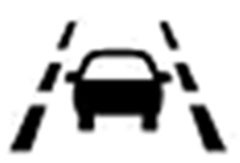
The Lane Keep Assist icon has several different indication modes:
- Solid green indicates the system is ready to
- Solid amber indicates Lane Keep Assist intervention is
- Flashing amber indicates a Lane Departure Warning alert (chime or safety seat vibration)
- Lane Keep Assist and Lane Departure Warning alerts are suppressed with any deliberate driver response (ie. steering, accelerating, braking, use of turn signal, see below)
Drivers can suppress/override Lane Keep Assist with the following deliberate maneuvers:
- Turning the steering wheel
- Braking
- Accelerating
- Turn signal is on in the direction of the lane crossing
Proper operation may be affected by factors outside the vehicle, including:
- Nearby vehicles ahead (tailgating)
- Sudden lighting changes, such as going through a tunnel
- Banked roads
- Poor lane markings, such as on some two-lane roads
- Snow, frost, ice, dirt, mud, bugs, etc on the windshield that are blocking the front camera
- Tar marks, cracks, shadows, temporary lane markings and other road imperfections
- Lane markings on one side of the road only (Lane Keep Assist provides assist only on the side with markings).
The driver is advised to turn off the system when these conditions are present; this does not indicate a system failure.
In addition, do not use Lane Keep Assist while towing a trailer or on a slippery road, as this may cause a loss of vehicle control.
SEOCONTENT-END
Bulletin No.: PIT5481D
Published date: 08/20/2018
To View or Download this Document Click Here
Bulletin No.: PIT5481C
Published date: 01/19/2018
To View or Download this Document Click Here
Bulletin No.: PIT5481A
Date: Dec-2016
To View or Download this Document Click Here
Bulletin No.: PIT5481
Date: Nov-2015
To View or Download this Document Click Here



- CEL Doctor: The ANCEL AD310 is one of the best-selling OBD II scanners on the market and is recommended by Scotty Kilmer, a YouTuber and auto mechanic. It can easily determine the cause of the check engine light coming on. After repairing the vehicle's problems, it can quickly read and clear diagnostic trouble codes of emission system, read live data & hard memory data, view freeze frame, I/M monitor readiness and collect vehicle information
- Sturdy and Compact: Equipped with a 2.5 foot cable made of very thick, flexible insulation. It is important to have a sturdy scanner as it can easily fall to the ground when working in a car. The AD310 OBD2 scanner is a well-constructed mechanic tool with a sleek design. It weighs 12 ounces and measures 8.9 x 6.9 x 1.4 inches. Thanks to its compact design and light weight, transporting the device is not a problem. The buttons are clearly labelled and the screen is large and displays results clearly
- Accurate Fast and Easy to Use: The AD310 scanner can help you or your mechanic understand if your car is in good condition, provides exceptionally accurate and fast results, reads and clears engine trouble emission codes in seconds after you fixed the problem. This device will let you know immediately and fix the problem right away without any car knowledge. No need for batteries or a charger, get power directly from the OBDII Data Link Connector in your vehicle
- OBDII Protocols and Car Compatibility: Many cheap scan tools do not really support all OBD2 protocols. AD310 scanner as it can support all OBDII protocols such as KWP2000, J1850 VPW, ISO9141, J1850 PWM and CAN. This device also has extensive vehicle compatibility with 1996 US-based, 2000 EU-based and Asian cars, light trucks, SUVs, as well as newer OBD2 and CAN vehicles both domestic and foreign. Pls confirm with our customer service whether it is compatible with your vehicle before purchasing
- Home Necessity and Worthy to Own: This is an excellent code reader to travel or home with as it weighs less and it is compact in design. You can easily slide it in your backpack as you head to the garage, or put it on the dashboard, this will be a great fit for you. The AD310 is not only portable, but also accurate and fast in performance. Moreover, it covers various car brands and is suitable for people who just need a code reader to check their car

- MAINTAIN PEAK PERFORMANCE AND SAFETY ON THE ROAD - Easily find and fix the problem with your vehicle using the INNOVA 5610 bidirectional scan tool. This OBD2 scanner diagnostic tool provides real-time solutions to troubleshoot issues. Access OBD2 and OEM live data with ease, making it an essential car scanner diagnostic tool. Perfect for those seeking reliable car diagnostic scanner and code readers & scan tools for vehicles.
- PRO-LEVEL FUNCTIONALITIES - Use the INNOVA 5610’s Enhanced Data Stream to view live data for advanced systems like ABS, SRS, transmission, and engine. The Special Reset Function lets you use dealership-level re-learn procedures. This car diagnostic scanner is ideal for those needing a bidirectional scan tool or mechanic tools automotive for professional repairs. Compatible with select vehicle makes and models; not universal.
- COMMAND WITH BIDIRECTIONAL CONTROLS - The INNOVA 5610 bidirectional scan tool sends commands to test functions such as fuel pump on/off or retracting the electronic parking brake. With this car scanner diagnostic for all cars, you can operate like a pro. Ideal for those seeking a car code reader and reset tool or advanced fixd car diagnostic tool capabilities. Compatible with select vehicle makes and models; not universal.
- EASY TO USE - The INNOVA 5610 OBD2 scanner diagnostic tool supports English, Spanish, and French. Easily use this scanner for car on most 1996 - 2023 (2024 coming soon) OBD2 vehicles to verify repairs. Designed for ease of operation, it’s a dependable code reader for cars and trucks and check engine code reader. To confirm vehicle coverage, please utilize Innova's Coverage Checker.
- BUY AND DRIVE WITH CONFIDENCE - Backed by ASE-Certified support, this car scanner pairs with the RepairSolutions2 app, trusted by 4M users, for wireless OBD scanner functionality. With free updates and no subscription fees, this durable car computer diagnostic reader ensures you’re prepared for any repair. A must-have diagnostic scanner for vehicles.

- 2026 Advanced ECU Coding Scan Tool: Maximize the capabilities of your vehicles with the ArtiDiag Pro. This scan tool, seamlessly compatible with renowned models such as VW, A-U-D-I, SKODA, SEAT, BENZ, and more, empowers you to uncover hidden features, deactivate annoying functions, and code retrofitted components for peak performance. Ensure a backup before coding and steer clear of problems on low battery levels.
- Efficient Diagnostics with Bidirectional Control: Say goodbye to uncertainty, streamline diagnostics, and reclaim valuable time with ArtiDiag Pro scan tool. This bidirectional scan tool exceeds expectations, enabling targeted tests on individual actuators to swiftly identify and resolve issues. Covering lights, door locks, fuel and coolant systems, windows, wipers, EVAP, and more in vehicle components.
- 35+ Services Resolve 90% of Repair Challenges: Unleash maximum productivity with the ArtiDiag Pro, a scan tool that tackles 90% of maintenance issues through its 35 special functions. Effortlessly clear oil maintenance indicators with oil reset. Engage the EPB Reset for brake system management and establish precise alignment with the Steering Angle Reset to define the straight-line reference position for your vehicle.
- FCA Autoauth : This diagnostic tool supports Autoauth for FCA SGW/Renault, Chrysler, Jeep, Dodge, Fiat etc. 2017 and later. NOTE: Due to Product Upgrade, there is no Chrysler 12+8 adapter, the BMW-20 Adapter in the package any more. We are sincerely sorry for the inconvenience. NOTE: Please confirm compatibility before purchase.(Topdon Website>Support>Vehicle Coverage)
- Professional Customer Support: At TOPDON, your satisfaction is our unwavering commitment. Experience hassle-free support and a lifetime of expert assistance. Should you encounter any challenges, reach out to us at 833-629-4832. For returns, please damage the packaging to prevent Amazon from reselling it. Please be advised that after two years, a subscription fee of 249 Bucks will apply.

- [Diagnose Like a Pro] BlueDriver Pro is a professional OBD2 scanner and diagnostic tool that helps you scan, understand, and clear vehicle trouble codes with confidence. Turn your phone into a powerful car diagnostic scanner—no guesswork, no unnecessary repairs.
- [Read and Clear More Codes Than Ever] Read and clear more codes than basic car code readers. Access enhanced diagnostics for Check Engine, ABS, SRS, Airbag, TPMS, Transmission.
- [Verified Fixes and Real-Time Data] Get unlimited, technician-verified repair reports matched to your VIN, with definitions, causes, and confirmed fixes. Monitor live vehicle data as you drive, view freeze frames, check smog readiness, and analyze Mode 6 test results.
- [Wireless & Bluetooth Enabled] - Say goodbye to wires. BlueDriver connects with Bluetooth via your phone/tablet to a sensor that plugs into your car's OBDII port. Get all of the capabilities of an expensive code reader & scan tool without any annoying wires.
- [Broad Make & Model Coverage] Strong support for GM, Ford, Stellantis (RAM, Jeep, Chrysler), Toyota, Honda, Nissan, Mazda, Subaru, Hyundai, Mercedes-Benz, BMW, and VW.
This product presentation was made with AAWP plugin.
My Tahoe 2017 Lane Keep Assist icon LED is not working (light on/off is not showing), but LKA is working and I could see the indicator in the dash while driving. Please advice how to enable LED.
My 2017 GMC Acadia Denali is equipped with the Lane Keep Assist (LKA) and Lane Departure Warning (LDW). All systems worked completely during a couple of test drives. After the purchase the seat vibration or audio alert did not operate as designed. The seat does vibrate on both sides while pulling into the garage so I know that works. The steering wheel also nudges when drifting out of the lane. My major issue is the lack of seat vibration as designed which the dealer claims was not meant to work all the time. Please advise
I would check with the dealer, Maybe there is an update available…
Do all 2016 Tahoe’s come with the lane assist feature?
Or dose the LS come w/ it?
Thanks
Not all come with this option, It is available on LS.
It seems that if the TPMS is inoperative, this disables the Lane Keep Assist. Can anyone confirm this ?