
NHTSA ID Number: 10201106
Manufacturer Communication Number: 15-NA-008
Summary
Voice recognition/Voice Command Poor or Erratic Performance
3 Affected Products
Vehicles
When calling using voice recognition/voice command, the system inserts #6, substitutes a different number randomly, or all numbers repeated back are wrong.
Poor grounding of the microphone through the ground circuit in the module can cause poor or erratic performance of the system.
Correction
Locate the Onstar module (Telematics Communication Interface Control Module) in the vehicle.
Disconnect the small 12 way X2 connector, and move circuit 5152 PK/BK wire from cavity 12 to correct ground cavity 5. Reinsert connector and complete the repair.
Tip: Use Terminal Removal Tool J-38125-559 from the J-38125 Terminal Repair Kit.
If you encounter a vehicle with this condition, please refer to Service Update #15663.
SEOCONTENT-START
Bulletin No.: 15-NA-008 Date: Dec-2015 Subject: Voice Recognition/Voice Command Poor or Erratic Performance Attention: This Bulletin also applies to any models that may be Export vehicles. Brand: Model: Model Year: VIN: Engine: Transmission: from to from to Buick, Chevrolet, GMC Enclave, Traverse, Acadia with UE1 2016 2016 SOP 2016 1GNKVHKD7G J156136 All All If you encounter a vehicle with this condition, please refer to Service Update #15663. Version 2 Modified December 10, 2015 – Removing Condition and Cause sections and referring dealers to Service Update #15663.
SEOCONTENT-END
1 Associated Document
Manufacturer Communications
Bulletin No.: 15-NA-008
Date: Dec-2015
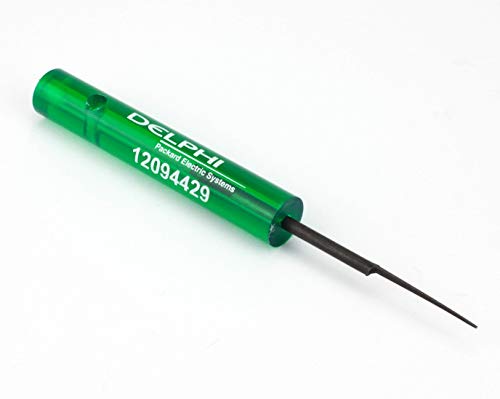

- Terminal tools work on conventional terminals as well as Pack-Con and Weather-Pack terminals found on many GM vehicles
- New blue terminal tool fits many Ford applications
- The handle slips over the probes to protect the technician's hand as well as to provide extra leverage
- item package weight: 0.76 pounds


- 【Package Include】Offers single, double pin extractors and casting tool of different sizes to fit most terminals. 82 Pieces electrical pin removal tool kit includes 28Pcs Single Pin Extractor, 30Pcs Double Pin Extractor, 24Pcs Casing Tool and 1 Protective Case
- 【Depinning Tool with Protective Case】This terminal tool removal kit set is sharp, so we provide a protective case for you. You can keep your depinning tools in it to make it more portable and prevent children from playing with them
- 【High Quality】Our pin removal tool set is made of high-quality stainless steel and plastic with high hardness. It is not easy to deform and can be used repeatedly for a long time. The pin headers are available in different specifications and are suitable for most electronic equipment maintenance, making your work more convenient
- 【Wide Application】The terminal extractor tool kit are common tools for most connector terminals, suitable for most cars, motorcycles and other electronic devices like household appliances
- 【Easy to Use】The terminal pin removal tool is easy to use, just push and pull the terminal pins with connector removal tool for removal effortlessly from the wire harness connectors without any damage. Kindly Note: Most of the wire harnesses are held in place with barb clips. You can use a tool to lift or flatten the barbs, and then gently pull out the wire ends. Pay special attention to strength and direction
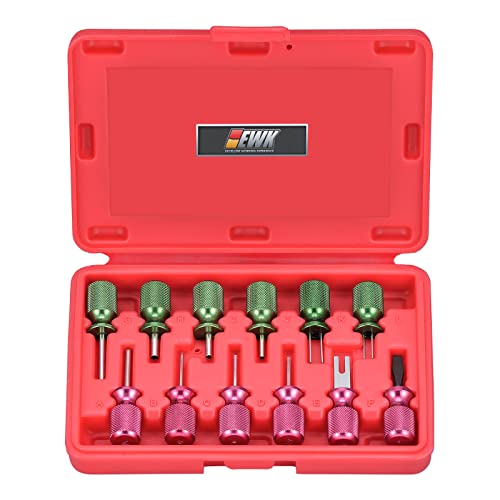
- 【 Easy to Use 】Effortlessly removing terminal wires from the wire harness connector and adding a new wire. No need to pry open the terminals, just push and pull the terminal pins. Maintain the factory original harness and plug in your own electronic device without any damage.
- 【 Package Include 】12 pcs different types of car plug terminal extraction repair tools. Red handle for GM : Spring Loaded Tube*1, Square Blade*1, Flat Blade*2, Fork Blade*1, Screwdriver*1. Green handle for wire terminal: Tube*4, Flat Twin Blade*2. Includes a durable blow-molded case for easy storage, organization, and portability.
- 【Durable Metal Handles】 Unlike rubber handles that can become sticky with prolonged use, the metal handles maintain a clean, solid feel over time. Color-coded markings provide quick tool identification, while the compact design helps reduce hand fatigue during automotive electrical repairs.
- 【 Wide Application 】Designed to service a wide range of electrical connectors on most domestic and imported vehicles, as well as home appliances and electronic devices.
- 【High-Quality】 Made in Taiwan with durable metal construction, this terminal pin removal tool kit resists bending and deformation for safer, more reliable terminal removal. Built for long-lasting performance in automotive electrical and wiring repair tasks.
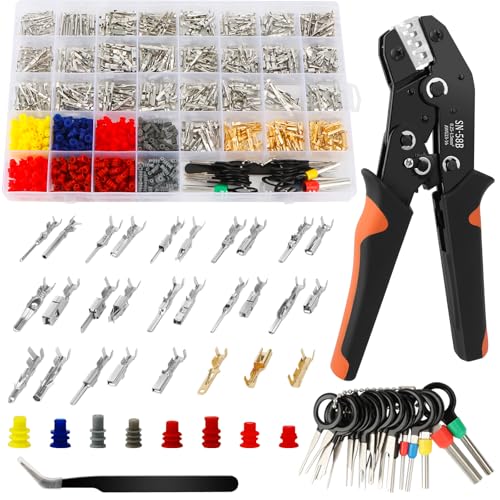
- 【Comprehensive Kit with 969 Pieces】: This automotive connector kit includes 969 pieces, featuring 550 pin connectors, 400 wire terminals, 18 depinning tools, and 1 tweezers. Perfect for various automotive wiring projects, ensuring you have all the necessary tools at hand to complete your tasks efficiently.
- 【28 Terminal Series with Multiple Wire Sizes】Includes terminal series covering different wire ranges from 0.2-0.75mm², 0.2-1.0mm², 0.3-1.0mm², 0.3-1.5mm² and 0.5-1.5mm². Please check the terminal size and wire range before installation to ensure proper compatibility.
- 【Wide Compatibility for Various Applications】: Suitable for cars, motorcycles, electric vehicles, and boats, this wire pin connector kit is designed to meet diverse needs. From auto wire connectors to hood pins kit for for car, the wide compatibility ensures you can tackle any electrical pin connectors project with ease.
- 【User-Friendly Design with Detailed Instructions】: The terminal pin removal tool kit comes with detailed instructions, making it easy for DIY enthusiasts and professionals alike. Whether you're using the pin terminal connectors or the wire terminal removal tool, the user-friendly design ensures a hassle-free experience.
- 【Excellent Sealing Performance】: With 28 types of female plugs and male wire connectors, this electric terminal kit provides excellent sealing performance. Perfect for gm electrical connectors and other automotive wiring connectors, the sealing ensures reliable connections in wet, dusty, or challenging environments.
This product presentation was made with AAWP plugin.