
NHTSA ID Number: 10224820
Manufacturer Communication Number: 10-00-89-006I
Summary
This service bulletin provides information for dealers on how to submit a product information report (PIR) (Canada Only).
1829 Affected Products
Vehicles
| MAKE | MODEL | YEAR |
| BUICK | ALLURE | 2006-2009 |
| BUICK | CASCADA | 2016-2019 |
| BUICK | CENTURY | 2001-2005 |
| BUICK | ENCLAVE | 2008-2023 |
| BUICK | ENCORE | 2013-2022 |
| BUICK | ENCORE GX | 2020-2022 |
| BUICK | ENVISION | 2016-2022 |
| BUICK | LACROSSE | 2005-2020 |
| BUICK | LESABRE | 2001-2006, 2013 |
| BUICK | LUCERNE | 2006-2012 |
| BUICK | PARK AVENUE | 2001-2005 |
| BUICK | RAINIER | 2003-2007 |
| BUICK | REGAL | 2001-2005, 2008-2020 |
| BUICK | REGAL TOURX | 2018 |
| BUICK | RENDEZVOUS | 2001-2007 |
| BUICK | TERRAZA | 2005-2008 |
| BUICK | VERANO | 2012-2017 |
| CADILLAC | ATS | 2013-2019 |
| CADILLAC | ATS-V | 2015-2018 |
| CADILLAC | CATERA | 2001-2003 |
| CADILLAC | CT4 | 2020-2022 |
| CADILLAC | CT5 | 2020-2022 |
| CADILLAC | CT6 | 2013-2021 |
| CADILLAC | CTS | 2003-2019 |
| CADILLAC | CTS-V | 2004-2007, 2010-2012, 2014-2016, 2018 |
| CADILLAC | DEVILLE | 2001-2005 |
| CADILLAC | DTS | 2004-2012 |
| CADILLAC | ELDORADO | 2001-2002 |
| CADILLAC | ELR | 2014-2017 |
| CADILLAC | ESCALADE | 2001-2023 |
| CADILLAC | ESCALADE ESV | 2003-2023 |
| CADILLAC | ESCALADE EXT | 2007-2014 |
| CADILLAC | ESCALADE EXT 1500 | 2002-2011 |
| CADILLAC | ESCALADE HYBRID | 2008-2014 |
| CADILLAC | LYRIQ | 2023 |
| CADILLAC | SEVILLE | 2001-2004 |
| CADILLAC | SLS | 2002, 2004 |
| CADILLAC | SRX | 2004-2019 |
| CADILLAC | STS | 2001-2012 |
| CADILLAC | XLR | 2003-2009 |
| CADILLAC | XT4 | 2019-2023 |
| CADILLAC | XT5 | 2013-2023 |
| CADILLAC | XT6 | 2020-2023 |
| CADILLAC | XTS | 2013-2020 |
| CHEVROLET | ALERO EXPORT | 2001-2002 |
| CHEVROLET | ASTRO | 2001-2005 |
| CHEVROLET | AVALANCHE | 2007-2014 |
| CHEVROLET | AVALANCHE 1500 | 2002-2013 |
| CHEVROLET | AVALANCHE 2500 | 2002-2007, 2013 |
| CHEVROLET | AVEO | 2004-2018 |
| CHEVROLET | BERETTA | 2002 |
| CHEVROLET | BLAZER | 2001-2009, 2019-2023 |
| CHEVROLET | BOLT EUV | 2022-2023 |
| CHEVROLET | BOLT EV | 2017-2023 |
| CHEVROLET | CAMARO | 2001-2002, 2010-2023 |
| CHEVROLET | CAPRICE | 2003-2004, 2011-2018 |
| CHEVROLET | CAPRICE POLICE PURSUIT | 2012-2017 |
| CHEVROLET | CAPTIVA | 2008-2018 |
| CHEVROLET | CAPTIVA SPORT | 2009-2012 |
| CHEVROLET | CAVALIER | 2001-2005 |
| CHEVROLET | CHEVY VAN | 2001, 2003 |
| CHEVROLET | CITY EXPRESS | 2015-2018 |
| CHEVROLET | CLASSIC | 2004-2006 |
| CHEVROLET | COBALT | 2002, 2005-2017 |
| CHEVROLET | COBALT SS | 2008-2010 |
| CHEVROLET | COLORADO | 2004-2022 |
| CHEVROLET | CORVETTE | 2001-2023 |
| CHEVROLET | CORVETTE Z06 | 2005-2008 |
| CHEVROLET | CORVETTE ZR1 | 2009 |
| CHEVROLET | CRUZE | 2010-2019 |
| CHEVROLET | DENALI | 2001-2006 |
| CHEVROLET | ENVOY | 2001-2002 |
| CHEVROLET | EPICA | 2005 |
| CHEVROLET | EQUINOX | 2005-2023 |
| CHEVROLET | EXPLORER | 2002 |
| CHEVROLET | EXPRESS | 2001-2022 |
| CHEVROLET | EXPRESS 1500 | 2001-2012, 2014 |
| CHEVROLET | EXPRESS 2500 | 2001-2011, 2014 |
| CHEVROLET | EXPRESS 3500 | 2001-2010, 2012, 2014 |
| CHEVROLET | EXPRESS 4500 | 2009, 2012, 2014, 2016 |
| CHEVROLET | EXPRESS CUTAWAY | 2013 |
| CHEVROLET | EXPRESS CUTAWAY VAN | 2006-2008 |
| CHEVROLET | G SERIES | 2001-2003 |
| CHEVROLET | G VAN | 2001-2002 |
| CHEVROLET | G VAN BUS | 2001-2011 |
| CHEVROLET | G1500 | 2003-2008 |
| CHEVROLET | G25 | 2001-2002 |
| CHEVROLET | G2500 | 2003-2005 |
| CHEVROLET | G30 | 2001-2002 |
| CHEVROLET | G35 | 2001-2002 |
| CHEVROLET | G3500 | 2003-2005, 2008 |
| CHEVROLET | G4500 | 2018 |
| CHEVROLET | HHR | 2006-2011 |
| CHEVROLET | IMPALA | 2001-2020 |
| CHEVROLET | IMPALA (GMX 211) | 2006 |
| CHEVROLET | INCOMPLETE/CUTAWAY C3 | 2001-2005 |
| CHEVROLET | JIMMY | 2001-2002 |
| CHEVROLET | L SERIES | 2001-2002 |
| CHEVROLET | L VAN | 2001-2002 |
| CHEVROLET | LUMINA | 2001-2002, 2008, 2014 |
| CHEVROLET | LUMINA APV | 2001 |
| CHEVROLET | M SERIES | 2001-2002 |
| CHEVROLET | M VAN | 2001-2002 |
| CHEVROLET | M/L | 2001-2002 |
| CHEVROLET | MALIBU | 2001-2022 |
| CHEVROLET | MALIBU CLASSIC | 2001-2005, 2007 |
| CHEVROLET | MALIBU ECO | 2013-2014 |
| CHEVROLET | MALIBU HYBRID | 2008-2010, 2016-2019 |
| CHEVROLET | MALIBU MAXX | 2004-2007 |
| CHEVROLET | METRO | 2001 |
| CHEVROLET | MONTE CARLO | 2001-2008, 2010 |
| CHEVROLET | MOTOR HOME | 2002 |
| CHEVROLET | N300 | 2014-2016, 2018 |
| CHEVROLET | N300 MAX | 2017 |
| CHEVROLET | OPTRA | 2004-2007, 2016 |
| CHEVROLET | ORLANDO | 2017 |
| CHEVROLET | PRIZM | 2001-2002 |
| CHEVROLET | ROADTREK | 2002 |
| CHEVROLET | S/T BLAZER | 2001-2005 |
| CHEVROLET | S10 | 2001-2007, 2016-2018 |
| CHEVROLET | SILVERADO 1500 | 2001-2023 |
| CHEVROLET | SILVERADO 1500 HD | 2001-2005 |
| CHEVROLET | SILVERADO 2500 | 2001-2023 |
| CHEVROLET | SILVERADO 2500 HD | 2001-2004 |
| CHEVROLET | SILVERADO 3500 | 2001-2023 |
| CHEVROLET | SILVERADO 3500 HD | 2001 |
| CHEVROLET | SILVERADO 4500HD | 2019-2023 |
| CHEVROLET | SILVERADO 5500HD | 2019-2023 |
| CHEVROLET | SILVERADO 6500HD | 2019-2023 |
| CHEVROLET | SONIC | 2011-2020 |
| CHEVROLET | SONOMA | 2001-2003 |
| CHEVROLET | SPARK | 2013-2022 |
| CHEVROLET | SPARK EV | 2014-2017 |
| CHEVROLET | SS | 2014-2018 |
| CHEVROLET | SSR | 2003-2007 |
| CHEVROLET | SUBURBAN | 2001-2023 |
| CHEVROLET | SUBURBAN 1500 | 2001-2011, 2021-2022 |
| CHEVROLET | SUBURBAN 2500 | 2001-2006, 2008-2011 |
| CHEVROLET | TAHOE | 2001-2023 |
| CHEVROLET | TAHOE HYBRID | 2008-2013 |
| CHEVROLET | TAHOE POLICE PURSUIT | 2010-2016 |
| CHEVROLET | TRACKER | 2001-2004 |
| CHEVROLET | TRAILBLAZER | 2001-2009, 2013-2014, 2017-2022 |
| CHEVROLET | TRAILBLAZER 360 | 2002-2009 |
| CHEVROLET | TRAILBLAZER EXT | 2002-2004, 2006 |
| CHEVROLET | TRAILBLAZER EXT 370 | 2002-2006 |
| CHEVROLET | TRANS SPORT | 2001-2002, 2005 |
| CHEVROLET | TRAVERSE | 2008-2023 |
| CHEVROLET | TRAX | 2013-2022 |
| CHEVROLET | UPLANDER | 2005-2009 |
| CHEVROLET | V SERIES | 2001 |
| CHEVROLET | VAN | 2001-2002 |
| CHEVROLET | VENTURE | 2001-2005 |
| CHEVROLET | VOLT | 2011-2019 |
| CHEVROLET | YUKON | 2001-2003 |
| GEO | METRO | 2001 |
| GEO | PRIZM | 2001-2002 |
| GEO | TRACKER | 2001-2002 |
| GMC | ACADIA | 2007-2023 |
| GMC | BLAZER | 2001-2002 |
| GMC | CANYON | 2004-2013, 2015-2022 |
| GMC | DENALI | 2001-2003, 2007-2015 |
| GMC | DIAMOND EDITION | 2001 |
| GMC | ENVOY | 2001-2013 |
| GMC | ENVOY 360 | 2002-2009 |
| GMC | ENVOY DENALI | 2006-2007 |
| GMC | ENVOY DENALI XL | 2006 |
| GMC | ENVOY XL | 2002-2004, 2006 |
| GMC | ENVOY XL 370 | 2002-2006 |
| GMC | ENVOY XUV | 2003-2005 |
| GMC | EXPRESS | 2001-2002, 2009 |
| GMC | G SERIES | 2001-2003 |
| GMC | G VAN | 2001-2002 |
| GMC | G VAN BUS | 2001-2011 |
| GMC | G1500 | 2003-2008 |
| GMC | G25 | 2001-2002 |
| GMC | G2500 | 2003-2005 |
| GMC | G35 | 2001-2002 |
| GMC | G3500 | 2003-2005, 2017-2018 |
| GMC | GM | 2001-2002 |
| GMC | HUMMER EV | 2022-2023 |
| GMC | INCOMPLETE/CUTAWAY C3 | 2001-2004 |
| GMC | JIMMY | 2001-2004 |
| GMC | JIMMY CLASSIC | 2005 |
| GMC | L SERIES | 2001-2003 |
| GMC | L VAN | 2001-2002 |
| GMC | M SERIES | 2001-2002 |
| GMC | M VAN | 2001-2002 |
| GMC | M/L SERIES | 2001-2002 |
| GMC | M/L VAN | 2001 |
| GMC | S/T JIMMY | 2001 |
| GMC | S15 | 2001-2002 |
| GMC | SAFARI | 2001-2005 |
| GMC | SAFARI (GMC) | 2001-2005 |
| GMC | SANANA | 2010 |
| GMC | SAVANA | 2001-2022 |
| GMC | SAVANA 1500 | 2001-2017 |
| GMC | SAVANA 2500 | 2001-2018 |
| GMC | SAVANA 3500 | 2001-2018 |
| GMC | SIERRA 1500 | 2001-2023 |
| GMC | SIERRA 1500 HD | 2001-2005 |
| GMC | SIERRA 2500 | 2001-2023 |
| GMC | SIERRA 2500 HD | 2001-2005 |
| GMC | SIERRA 3500 | 2001-2023 |
| GMC | SIERRA 3500 HD | 2001 |
| GMC | SIERRA DENALI | 2002-2003, 2007-2020 |
| GMC | SONOMA | 2001-2006 |
| GMC | SONOMA CREW | 2001-2005 |
| GMC | SUBURBAN | 2001-2004 |
| GMC | TAHOE | 2001-2003 |
| GMC | TERRAIN | 2009-2022 |
| GMC | YUKON | 2001-2023 |
| GMC | YUKON DENALI | 2001-2013, 2015-2019 |
| GMC | YUKON DENALI XL | 2003-2018 |
| GMC | YUKON HYBRID | 2008-2013 |
| GMC | YUKON XL | 2001-2022 |
| GMC | YUKON XL 1500 | 2001-2012 |
| GMC | YUKON XL 2500 | 2001-2013 |
| GMC | YUKON XL DENALI | 2001-2003 |
| HUMMER | H1 | 2003 |
| HUMMER | H2 | 2002-2010 |
| HUMMER | H2 SUT | 2003-2009 |
| HUMMER | H3 | 2003-2010 |
| HUMMER | H3 SUT | 2009 |
| HUMMER | H4 | 2006-2007 |
| OLDSMOBILE | ALERO | 2001-2004 |
| OLDSMOBILE | AURORA | 2001-2003 |
| OLDSMOBILE | BRAVADA | 2001-2005 |
| OLDSMOBILE | CUTLASS | 2001 |
| OLDSMOBILE | INTRIGUE | 2001-2002 |
| OLDSMOBILE | SILHOUETTE | 2001-2004 |
| PONTIAC | AZTEK | 2001-2005 |
| PONTIAC | BONNEVILLE | 2001-2006 |
| PONTIAC | FIREBIRD | 2001-2002 |
| PONTIAC | G3 | 2008-2010 |
| PONTIAC | G4 | 2006, 2008 |
| PONTIAC | G5 | 2007-2010 |
| PONTIAC | G6 | 2003-2010 |
| PONTIAC | G8 | 2008-2010 |
| PONTIAC | GRAND AM | 2001-2005 |
| PONTIAC | GRAND PRIX | 2001-2008 |
| PONTIAC | GTO | 2004-2007 |
| PONTIAC | LACROSSE | 2005 |
| PONTIAC | MONTANA | 2001-2009 |
| PONTIAC | PURSUIT | 2005-2009 |
| PONTIAC | SOLSTICE | 2006-2010 |
| PONTIAC | SUNFIRE | 2001-2005 |
| PONTIAC | TORRENT | 2006-2009, 2014 |
| PONTIAC | TRANS AM | 2001-2002 |
| PONTIAC | TRANS SPORT | 2001-2003 |
| PONTIAC | VIBE | 2001-2010, 2014 |
| SAAB | 9-2X | 2005-2006 |
| SAAB | 9-3 | 2001-2010 |
| SAAB | 9-5 | 2001-2010 |
| SAAB | 9-7X | 2005-2009 |
| SATURN | ASTRA | 2008-2010 |
| SATURN | AURA | 2005, 2007-2010 |
| SATURN | AURA HYBRID | 2007-2009 |
| SATURN | ION | 2003-2008 |
| SATURN | L200 | 2003-2005 |
| SATURN | L300 | 2003-2005 |
| SATURN | LS | 2001-2003 |
| SATURN | LW200 | 2001-2005 |
| SATURN | OUTLOOK | 2007-2010 |
| SATURN | RELAY | 2005-2008 |
| SATURN | SC | 2001-2002 |
| SATURN | SKY | 2007-2010 |
| SATURN | SL | 2001-2002 |
| SATURN | SW | 2001 |
| SATURN | VUE | 2002-2010 |
| SATURN | VUE HYBRID | 2007-2009 |
1 Associated Document
Manufacturer Communications
Bulletin No.: 10-00-89-006I
Date: October, 2022

- [Easy to Use—Work Out of the Box] + [FOXWELL 2026 New Version] FOXWELL NT604 Elite scan tool is the 2026 new version from FOXWELL, designed for car owners who want to figure out the cause of issues before fixing car problems by scanning common systems like ABS, SRS, engine, and transmission. The NT604 Elite obd2 scanner diagnostic tool comes with the latest software—no need to waste time downloading software first. Plug the scanner into the OBDII port with OBDII cable to start the diagnosis.
- [Affordable] + [Reliable Car Health Monitor] Will you be confused what happens when the warning light of ABS/SRS/transmission/check engine flashes? Instead of taking your cars to dealership, this FOXWELL scanner will help you do a thorough scanning and detection for your cars and pinpoint the root cause. Note:The device is a diagnostic tool, not a repair tool. To turn off a warning light, you must first physically repair the issue causing it. Only then can the scanner be used to clear the corresponding fault code.
- [5 in 1 Car Diagnostic Scanner] Compared with obd scanners (50-100), NT604 Elite code scanner not only includes their OBDII diagnosis but also serves as ABS/SRS scanner, transmission and check engine code reader. When it’s an odb2 scanner, you can use it to check if your car is ready for annual test through I/M readiness menu. In addition, live data stream, built-in DTC library, data play back and print, all these features are a big plus for it. Note: doesn't support maintenance functions like reset or relearn. For the SRS system, NT604 Elite can read and clear common fault codes not caused by a crash, but crash/collision data cannot be cleared.
- [Fantastic AUTOVIN] + [No extra software fee] Through the AUTOVIN menu, this NT604 Elite car scanner allows you to get your V-IN and vehicle info rapidly, no need to take time to find your V-IN and input one by one. What's more, the NT604 Elite ABS SRS scanner supports 60+ car brands from worldwide (America/Asia/Europe). You don’t need to pay extra software fee. AUTOVIN may not work on some older vehicles or certain vehicle brands. If AUTOVIN fails, please input the vin code manually or go to the Diagnostic Menu to select your vehicle model.
- [Solid protective case KO plastic carrying bag] + [Lifetime update] Almost all same price-level car scanner diagnostic tool only offers plastic bag to hold the scanner.However, NT604 Elite automotive scanner is equipped with solid protective case, preventing your obd2 scanner from damage. Then you don’t need to pay extra money to buy a solid toolbox.
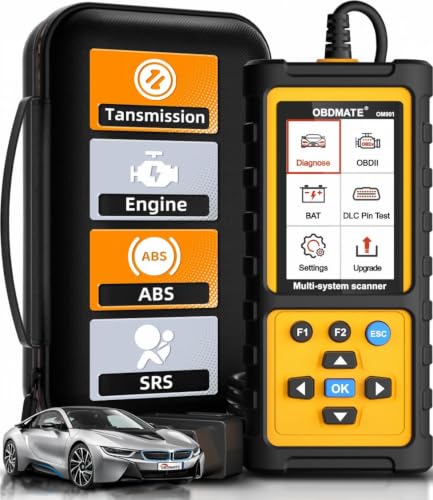
- 【Reset ABS/SRS/Transmission/Engine Lights】 More than an check engine code reader, OBDMATE OM901 obd2 scanner performs comprehensive diagnostics for the 4 most-used systems (ABS/SRS/Engine/Transmission). It quickly clears fault codes, turns off warning lights, read data stream and auto VIN.
- 【3.5" Handheld Scanner with 4 System Diagnose】 3.5" Super large TFT screen equipped displays an intuitive menu and clear readings of various sensors from ABS, SRS, ECM and TCM systems. It arrived with a silicone protective case and hard-shell carrying case, ensuring long-lived durability and drop resistance. The car diagnostic tool is plug-to-play designed, plug it and get diagnosis started without any batteries or updates required.
- 【One-Click I/M Readines&Full OBD2 Functions】 Press F1 to get an intuitive corloured form about whether various emissions-related systems on the vehicle are operating properly. Help you get smog-check ready quickly. OM901 car scanner supports all essential OBD2 functions you need: read & clear codes, view freeze frame, read I/M readiness, retrieve VIN, live data stream (with graphing display), O2 sensor test, onboard monitoring mode, and EVAP leak test.
- 【Battery Voltage Check&DLC Pin Test】 It allows you to monitor battery health by testing current battery voltage. Plus, this obd2 diagnostic tool features DLC 16-PIN test to check current voltage of every pin.
- 【Automotive Scanner Diagnostic Kit】 The package comes with 1 car scanner, 1 USB-type c cable, 1 hard storage bag and 1 user manual(en). Free to update without any hidden fees. 5 languanges available in setting including English, French, Italian, German and Espanish. Valuable and Portable, making it a great tool kit for car owners, DIY enthusiasts, and professional mechanics.

- [Diagnose Like a Pro] BlueDriver Pro is a professional OBD2 scanner and diagnostic tool that helps you scan, understand, and clear vehicle trouble codes with confidence. Turn your phone into a powerful car diagnostic scanner—no guesswork, no unnecessary repairs.
- [Read and Clear More Codes Than Ever] Read and clear more codes than basic car code readers. Access enhanced diagnostics for Check Engine, ABS, SRS, Airbag, TPMS, Transmission.
- [Verified Fixes and Real-Time Data] Get unlimited, technician-verified repair reports matched to your VIN, with definitions, causes, and confirmed fixes. Monitor live vehicle data as you drive, view freeze frames, check smog readiness, and analyze Mode 6 test results.
- [Wireless & Bluetooth Enabled] - Say goodbye to wires. BlueDriver connects with Bluetooth via your phone/tablet to a sensor that plugs into your car's OBDII port. Get all of the capabilities of an expensive code reader & scan tool without any annoying wires.
- [Broad Make & Model Coverage] Strong support for GM, Ford, Stellantis (RAM, Jeep, Chrysler), Toyota, Honda, Nissan, Mazda, Subaru, Hyundai, Mercedes-Benz, BMW, and VW.
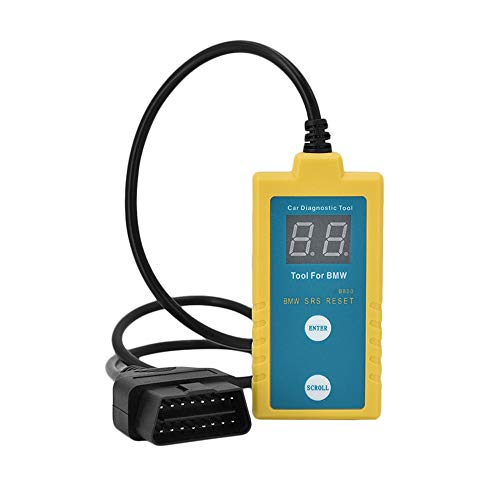
- ✔️【Professional SRS Reset for 1994-2003 BMW】 Designed specifically for classic BMW models (1994-2003). This B800 scanner reads & clears SRS airbag fault codes, turns off the warning light, and saves you a costly dealer visit. Confirmed compatible with: E36, E46 (EXCEPT 2001 330i), E34, E38, E39, Z3, and X5 (E53). NOT compatible with any BMW built before 1994 or after 2003.
- ✔️【Important: Two Different Connection Ports – Read Before Use】 To avoid “not working” issues, please note: For 1994–2000 BMWs (most E36, E34, Z3, early E39), the SRS diagnostic port is a round 20-pin connector under the hood. You MUST use the included 16-pin to 20-pin adapter cable. For 2000–2003 models (late E46, E39, X5), use the standard OBD-II port inside the cabin. Incorrect connection is the #1 reason for “incompatibility” reports.
- ✔️【Read & Clear Fault Codes in Minutes】 Quickly diagnose why your SRS light is on. The scanner accurately reads fault codes from airbag and seatbelt pretensioner systems. With one button press, clear the codes and reset the SRS warning light in seconds. No expensive dealer tools needed.
- ✔️【User-Friendly for DIYers – No Mechanic Required】 Easy operation with an intuitive button layout: ‘Enter’ to confirm, ‘Scroll’ to navigate. The clear LCD screen shows results instantly. Includes a step-by-step manual (revised for clarity) to guide you through the entire reset process.
- ✔️【Reliable Support with 1-Year Warranty】 We stand behind the quality of our B800 scanner. It comes with a 1-Year Hassle-Free Warranty. If you have any questions or need support, please contact us with your Order ID, and our dedicated team will assist you promptly.

- [All System Diagnostics, Professional-Level Scanner] - BLCKTEC 460T is the ultimate OBD2 diagnostic tool for home mechanics and professionals. It supports all 10 OBD2 modes, reads and clears Engine/Transmission/ABS/SRS codes, performs All-System Diagnostics, offers workshop reset tools, and provides real-time live data. It helps you pinpoint issues, assess your car's condition, and prepare for SMOG checks with ease. NOTE: Function availability depends on your vehicle. Before you buy, be sure to use the Compatibility Checker on BLCKTEC website or contact our customer support to verify that the features you need are supported for your vehicle’s specific year, make, and model.
- [12+ Most Popular Reset Functions] - BLCKTEC 460T OBD2 scanner offers 12+ dealer-level service functions, including Oil Maintenance Reset, ABS Bleeding, EPB Reset, SAS(Steering Angle Sensor) Recalibration, DPF(Diesel Particulate Filter) Reset, Throttle Body Relearn, Battery Reset/Initialization, TPMS Relearn, Transmission Reset, Fluid Change Reset, Maintenance Reset and more, enabling you to perform workshop services like a pro. NOTE: Function availability depends on your vehicle. Be sure to use the Compatibility Checker on BLCKTEC website to verify that the features you need are supported for your vehicle.
- [Real-Time OBD2 and OEM Live Data, Freeze Frame Data] - BLCKTEC 460T helps diagnose vehicle issues when warning lights like Check Engine Light or ABS/SRS Light appear. It offers detailed DTC info, ECU Freeze Frame Data, and real-time OBD2 and advanced OEM live data, including Engine, Transmission, ABS, SRS, and more, making it easy to diagnose and resolve vehicle problems. You can view, graph, record, replay, and overlay up to four live data streams in a single graph for better analysis.
- [AutoVIN, AutoReLink, AutoScan, 3X Faster] - Equipped with AutoVIN technology, 460T automatically retrieves the VIN to save you time. Its AutoScan and AutoReLink features scan all of the vehicle's ECUs and detect any fault codes immediately after you plug the scanner into the vehicle's OBD2 port - no button presses required. Additionally, it regathers DTC and I/M readiness information every 30 seconds, simplifying monitor tests. 460T's advanced technology makes it 3X faster than other products.
- [Get RepairSolutions2, the #1 Auto Repair App for Free] - When paired with RepairSolutions2(RS2) App, 460T becomes even more powerful. RS2's Verified Fix Database built by master technicians, provides the parts needed for the repair. Additionally, RS2 gives you access to OEM warranty info, maintenance schedules, TSB, and dealership recall info, making car care easier than ever. RS2 is free with no subscription fees and it stores your car scan reports in the cloud, allowing you to access, share, or print them anytime and anywhere.
SEOCONTENT-START
Copyright 2022 General Motors LLC. All Rights Reserved. Service Bulletin Bulletin No.: 10-00-89-006I Date: October, 2022 INFORMATION Subject: Information for Dealers/Technicians on When and How to Submit a Product Information Report (PIR) (Canada Only) Models: 2023 and Prior GM Passenger Cars and Light Duty Trucks Attention: U.S. dealers should refer to the latest version of Corporate Bulletin Number 02-00-89-002. This bulletin has been revised to add the 2022-2023 Model Years, remove references to the Enhanced and the Legacy PIR forms, and update information on the CSMT Phone App. Please discard Corporate Bulletin Number 10-00-89-006H. Effective October 1, 2022, the Certified Service Mobile Toolbox Application (CSMT App) is the only method for PIR submission to General Motors of Canada Company (GMCC). The legacy method of submitting a PIR via the Product Information Report Online (PIR Online) tool in GlobalConnect has been decommissioned. Dealers/Technicians play a key role in reporting product issues via Product Information Reporting. The timeliness and detailed information in these reports proves to be extremely important to the product problem resolution process. This bulletin will offer information on when and how to submit a Product Information Report. Guidelines for Submitting a Product Information Report (PIR) Product Information Reports are an important tool that help us collectively identify and quickly address emerging issues on our vehicles, particularly during the launch of new programs. The Critical Product Concerns are: Safety, no start, walk-home conditions. A good rule of thumb when considering when to submit a report is whether it meets the “Critical Points” below: Critical Timing: Safety Concern, Vehicle in dealership, Concerning plant build condition. Critical Information: Safety concerns, vehicle currently at dealership with issue present, assembly plant build issues. In addition to the examples of critical conditions noted above, product information reports can also be helpful for communicating: • Wire harness routing causing damage (Critical information communicated with photos) • Emerging conditions that have required repetitive repairs with no apparent service bulletin or PI (Critical Product Concern) • Significant issues not typically submitted as a warranty claim (Critical Product Concern or Critical Information) • Vehicle operating normally but condition unacceptable to the customer • Critical issues found during Pre-Delivery Inspection (PDI) or with GM Accessories Important: Be clear, accurate, professional and as descriptive as necessary to help others fully understand the issue. Service Information (SI) Feedback, not Product Information Reports, should be submitted for the following: • Issues with Service Information (SI) repair information • Issues with the Technical Service or Preliminary Information Bulletin • Issues with the Labor Time Guide Page 2 October, 2022 Bulletin No.: 10-00-89-006I Process of Submitting a Product Information Report (PIR) Note: The CSMT Mobile Phone App is the only method for PIR submission. Submit Product Information Reports (PIRs) using the Certified Service Mobile Toolbox Application (CSMT App). The CSMT Phone App allows you to send PIRs from your phone with photos or video. To submit a PIR, you must have: 1. CSMT Phone App installed 2. E-mail application on your phone Photos/Video Important: Photos and/or video must be taken while in the process of completing the PIR (while attaching a previously saved photo or video is not currently permitted, it will be available soon in a coming update to the CSMTapp). Photos should: • show a clear close up (or multiple), and a distance photo so it is clear where on the vehicle the issue is located • use a pointer (finger/pen) to guide the viewer where to look (when necessary) Using the CSMT Mobile Phone App to Submit a PIR The CSMT App provides a Product Information Reporting (PIR) tool within the application. Other tools within the CSMT App include the Pre-Repair Authorization (PRA) Process. (Refer below to “Getting the App”) Steps to submit a PIR via the CSMT App: 1. You see an issue with a GM product and would like to submit a Product Information Report. 2. Open the CSMTapplication and log in using your Global Connect ID and password. 3. Select PIR from the Menu. 4. Enter the last 8 digits of the VIN (or full VIN or Scan), tap VALIDATE, then select and confirm Vehicle. 5. Enter Odometer and Condition (mandatory fields). 6. Enter additional information (Cause, Correction, Job Card #, TAC Case #, Parts Manager Name, Parts Manager Phone Number, Parts Manager Email, Part #, Comments). • Scroll down until you have filled in all applicable boxes. • When you get to the bottom, you will see the camera icon. 7. Tap the camera icon to enter “Gallery” view, then tap “Add Media” to take a photo(s) and/or record a video to help describe the issue. • If photos/video are taken, they will be displayed in “Gallery” view. • If necessary, tap Edit to select and delete any unwanted media. • When done with photos/video, tap the back arrow to exit “Gallery” view. 8. Tap Next and review your data in “PIR Form Review”, prior to final submission. • Carefully review the data and any photos/video media attachments. • This is the last opportunity to edit your report data and media entries. • If necessary, tap the back arrow to continue editing as required. 9. When satisfied, tap Next and advance to the E-mail screen. • The report will be sent from the E-mail application you have installed on your phone. • If prompted, select the E-mail application to utilize while submitting the report (i.e., Gmail). • You will now see the report data in your E-mail application, and ready for submission. (You may need to scroll to view the entire report with any pictures and video attachments). Important: DO NOT use the back button on the E-mail screen or use your phone’s menu back button. The back button will cancel your report and erase all entries and photos. 10. From this window, you MUSTselect the Send icon or command on the screen to complete the submission of the PIR. 11. An on-screen message will appear for three seconds displaying “Thank you for submitting a report. Please check your sent messages to verify.” Note: A successful PIR submission can be verified by reviewing the “Sent” messages within your phone’s E-mail application. Getting the App Apple – Go to the App Store, search for and download the CSMTapp Android – Go to the Play Store, search for and download the CSMTapp Apple or Android Install: 1. Once downloaded and opened, the app will ask to send you notifications. Click “Allow” to finish the install. 2. Login as “Dealer” and then input the same Username and Password that is used to access Global Connect. • If you can’t remember your password, use the “FORGET PASSWORD” link on the GC login screen. • If this does not work, the employee must work with the Dealership PSC or PSA administrator to review your system credentials. 3. You can ‘Enable Touch ID’ during the first login or enable it later within the App menu ‘Settings.’ Bulletin No.: 10-00-89-006I October, 2022 Page 3 4. Read and accept the Privacy Statements. 5. Fill in your Profile information. Note: The current CSMT Version 3.6 is only compatible with the following devices: • Apple iPhone or iPad devices must have operating systems (iOS) version 13.6 or higher • Android devices must have operating systems (OS) version 8.1 and up How to check the version of your operating system: Apple: Settings/General/About/Software Version Android: Settings/About Phone/Software Information/ Android Version What if my device is not compatible? Users should first check to see if there are system updates available for their device. Apple and Android devices unable to update to a compatible system will no longer be able to access or use the CSMTapp. Users may want to consider upgrading to a compatible device. GM bulletins are intended for use by professional technicians, NOT a “do-it-yourselfer”. They are written to inform these technicians of conditions that may occur on some vehicles, or to provide information that could assist in the proper service of a vehicle. Properly trained technicians have the equipment, tools, safety instructions, and know-how to do a job properly and safely. If a condition is described, DO NOT assume that the bulletin applies to your vehicle, or that your vehicle will have that condition. See your GM dealer for information on whether your vehicle may benefit from the information. WE SUPPORT VOLUNTARY TECHNICIAN CERTIFICATION
**************************************************************************************************************
**************************************************************************************************************
SEOCONTENT-END
This product presentation was made with AAWP plugin.